
Agile project management promises flexibility. But without a clear, shared view of sprint tasks, story points, and overall delivery progress, that flexibility quickly becomes confusion.
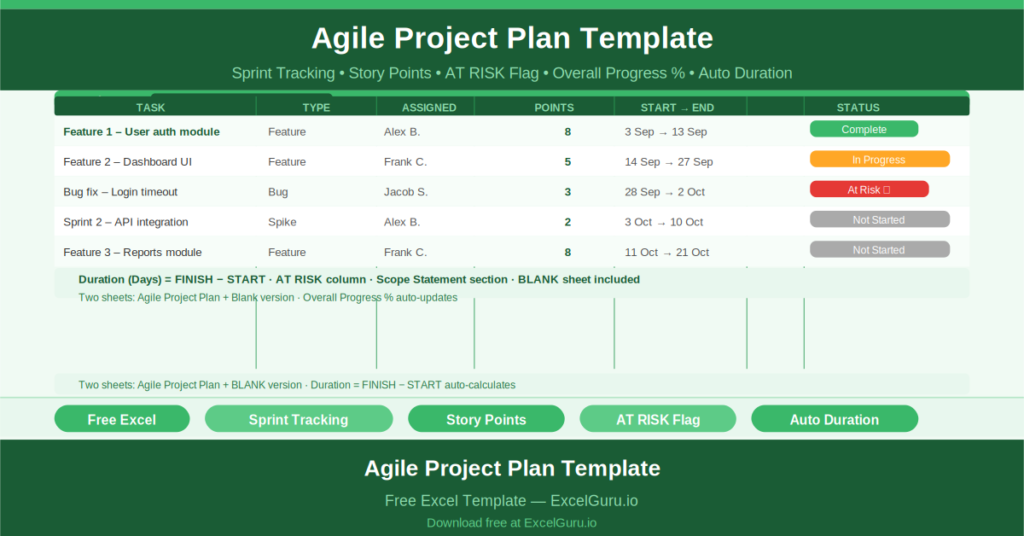
This free Excel Agile Project Plan Template gives development teams, product owners, and scrum masters a structured single-file planning document. It tracks sprints, tasks, feature types, story points, responsible team members, start and finish dates, and a calculated duration — all feeding into an overall project progress percentage at the top.
Try Project Action Plan Template if you want to map the action plans separately.
What Is the Agile Project Plan Template?
The Agile Project Plan Template is a free Microsoft Excel workbook with two sheets: a fully populated sample plan for a Product Release project, and a blank version ready for immediate use.
The template is structured around sprint-based delivery. Tasks are organised within named sprints, each with its own date range. An overall progress percentage tracks completion across all sprints simultaneously.
The Sprint Task Structure
Every task in the agile plan captures seven fields:
- Task Name: the specific deliverable or user story
- Feature Type: the category of work (Feature, Bug, Spike, etc.)
- Responsible: the team member assigned to the task
- Story Points: the complexity/effort estimate in agile points
- Start and Finish dates
- Duration (Days): auto-calculated as Finish minus Start
- Status: Complete, In Progress, Not Started, At Risk
The sample project — Product Release, managed by Alex B. — runs from 2 September to 10 October 2022. Sprint 1 runs from 3 September to 13 September with Feature 1 assigned to Alex B. as the first task. You can change/ modify the sample data of the project to quickly get started.
Overall Progress and AT RISK Flagging
At the top of the plan, an Overall Progress field tracks the percentage of the project completed across all sprints. The sample shows 20% progress for the Product Release project.
An AT RISK column flags tasks or sprints that are at risk of missing their target dates. This visual indicator allows the scrum master and project manager to focus attention on the right tasks during daily standups and sprint planning sessions — without reading every row individually.
Duration Auto-Calculation
The Duration (Days) column uses the formula =H6-G6 to calculate the number of calendar days between the start and finish dates automatically. Changing either date recalculates the duration instantly, keeping the plan accurate as dates shift.
Who Should Use This Template?
Scrum masters and agile delivery leads who need a lightweight, no-subscription alternative to Jira or Azure DevOps for small teams will find this template covers the essential sprint tracking requirements precisely.
Product owners managing feature backlogs across multiple sprints will use the Feature Type and Story Points columns to monitor velocity and plan sprint capacity.
Freelance developers and small agencies who deliver work in iterative sprints will use the template as a client-facing delivery schedule that is readable without any specialist tool.
How to Use the Template
Open the Agile Project Plan — BLANK sheet. Enter the Project Name, Project Manager, Start Date, and End Date. Add your sprints with their date ranges. For each task within a sprint, complete the task name, feature type, responsible person, story points, start, and finish. The Duration column calculates automatically.
Update the Status column as tasks progress. Review the Overall Progress percentage and AT RISK flags in your weekly planning sessions.
Download the free Agile Project Plan Template and manage your next sprint with structure, visibility, and no software subscription.