
Before any significant project or investment receives approval, stakeholders need one question answered: is it worth it? A cost benefit analysis provides that answer in structured, quantified form.
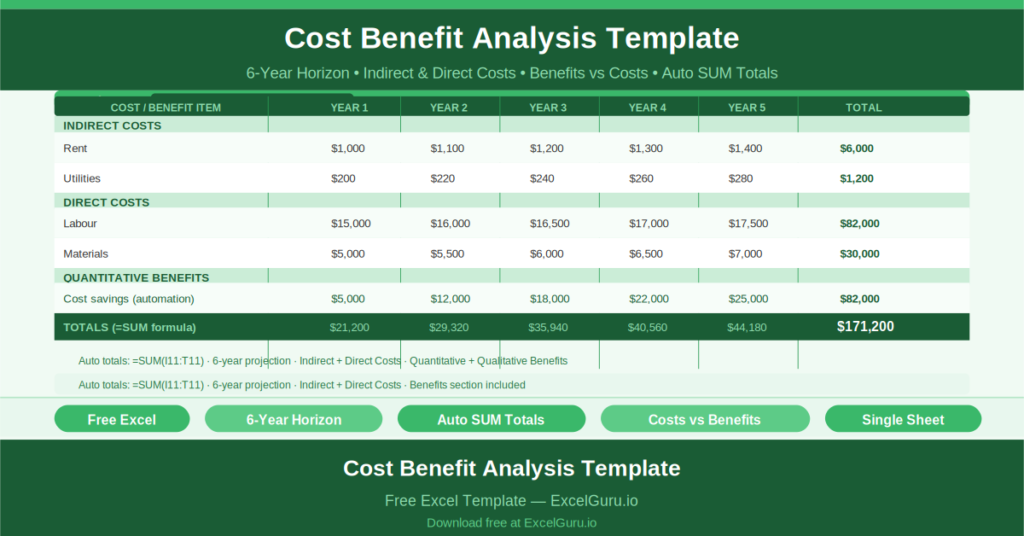
This free Excel Cost Benefit Analysis Template lets you compare projected costs against anticipated benefits over a six-year horizon. All totals calculate automatically. The template covers both indirect and direct costs, separates quantitative from qualitative benefits, and produces a clear financial comparison that any sponsor or board can read and act on.
Explore GAP Analysis Project Template In Excel.
What Is the Cost Benefit Analysis Template?
The Cost Benefit Analysis Template is a free Microsoft Excel workbook with a single sheet. It tracks a project’s costs and benefits over six years, from Year 1 through Year 6, with an auto-calculated Total column for each line item.
Three header fields anchor the analysis: Project Name, Project Manager, and Date Revised. These identify the document and signal when the analysis was last updated.
The Two-Section Cost Structure
The cost section divides expenditure into two categories:
- Indirect Costs: overheads not directly tied to delivery — Rent, Utilities, and similar ongoing operational costs
- Direct Costs: costs that arise directly from the project — labor, materials, technology, and other project-specific expenditure
The sample data demonstrates the indirect cost section with annual rent starting at $1,000 in Year 1 and rising to $1,500 in Year 6, and utilities starting at $200 in Year 1. Each row uses =SUM(I11:T11) to total costs across all six years automatically.
Year-by-Year Projection Columns
Each cost and benefit row spans six year columns. This multi-year view is what makes a cost benefit analysis genuinely useful. A project that costs more in Year 1 but significantly less in Years 2 through 6 looks very different from a project with a flat annual cost — and only a year-by-year comparison reveals that difference.
The six-year horizon covers most project payback periods. For longer investments, additional year columns can be added and the SUM range extended accordingly.
The Benefits Section
Opposite the costs, the template tracks quantitative benefits (revenue increases, cost savings, efficiency gains expressed in financial terms) and qualitative benefits (improved customer satisfaction, reduced risk, better employee experience — real but harder to quantify).
Together, costs and benefits produce the net analysis: whether the project creates value or destroys it, and over what time horizon the investment pays back.
Who Should Use This Template?
Finance teams preparing capital expenditure proposals will use the template to build the financial justification for board or steering committee approval.
Project managers developing business cases will use the CBA as the quantitative backbone of their argument — moving beyond qualitative descriptions of benefit to a concrete financial comparison.
Operations leaders evaluating technology investments, process changes, or facility decisions will use the six-year horizon to understand the long-term cost profile before committing.
How to Use the Template
Open the workbook. Enter the project name, manager, and date. For each cost category, enter the projected annual amount in the Year 1 through Year 6 columns. The Total column sums automatically. Repeat for benefits. Review the net position and adjust assumptions as needed.
Download the free Cost Benefit Analysis Template and make every investment decision based on a clear, six-year financial picture.