
Every organisation has a gap between where it is today and where it needs to be. The challenge is not identifying that gap exists — it is documenting it clearly enough to turn it into an actionable plan.
A gap analysis template forces that clarity. Current state sits in one column. Future state sits in the next. The gap, its size, the action needed, the priority, the owner, and the timeline follow in sequence. The result is a document that converts observation into accountable delivery.
This free Excel Basic Gap Analysis Template gives you a complete, structured gap analysis for any project or organizational improvement initiative. Try Other Project Management templates in Excel.
What Is the Basic Gap Analysis Template?
The Basic Gap Analysis Template is a free Microsoft Excel workbook with two sheets: the gap analysis itself and a “How To Use This Template” guide.
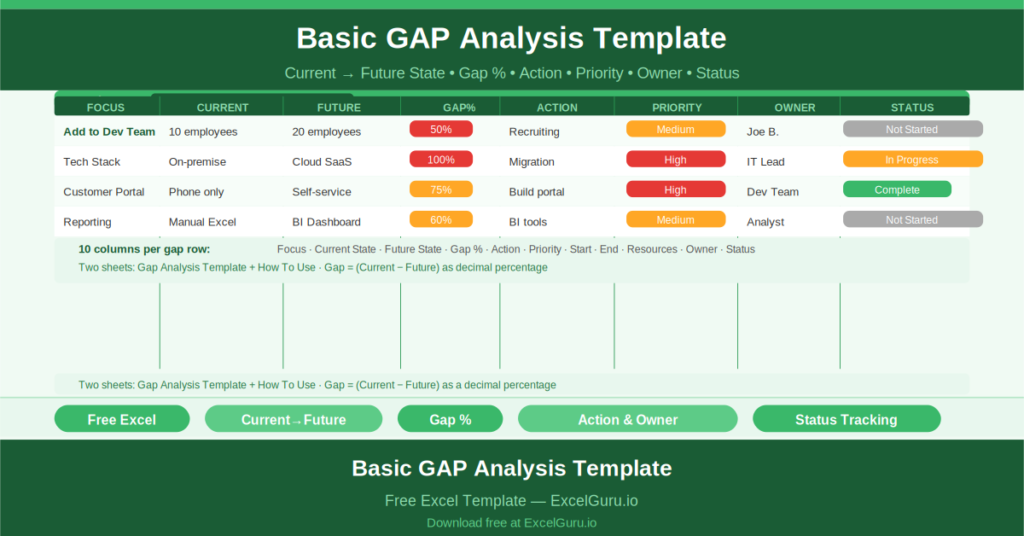
The template tracks improvement areas by Focus, comparing where the organisation is now against where it needs to be. The difference between the two states — the gap — is captured as a percentage. Actions, priorities, owners, start and end dates, resources, and status round out each row.
The Ten-Column Structure
Each gap row captures ten data points:
- Focus: the area being analysed (e.g., team size, technology, process)
- Current State: what exists today
- Future State: what is required
- Gap: the percentage difference between current and future (calculated)
- Action: the specific step to close the gap
- Priority: High, Medium, or Low
- Start: the action start date
- End: the target completion date
- Resources: what is needed to deliver the action
- Owner: the person responsible for the action
- Status: Not Started, In Progress, Complete
The sample data illustrates this precisely. Focus: “Add to Dev Team.” Current State: 10 employees. Future State: 20 employees. Gap: 50% (0.5). Action: Recruiting. Priority: Medium. Start: 1 June 2021. End: 15 December 2021. Resources: Hire recruiter. Owner: Joe B. Status: Not Started.
Gap as a Calculated Percentage
The Gap column captures the proportional shortfall between the current and future state as a decimal (0.5 = 50%). This makes gaps across different focus areas directly comparable — regardless of whether the metric is headcount, revenue, system capacity, or process maturity.
Turning Analysis into Accountability
The Action, Owner, and Status columns transform the gap analysis from a diagnostic document into an accountability tool. Each gap has a named person responsible for closing it, a specific action to take, and a visible status that anyone reviewing the document can assess immediately.
Who Should Use This Template?
Business analysts conducting requirements discovery or organisational assessments will use the template to structure their findings in a format that moves directly from analysis to recommendation.
Project managers building the evidence base for a project business case will use the gap analysis to quantify why the project is needed and what specifically needs to change.
Operations managers identifying process, technology, or headcount gaps will use the template to convert informal improvement conversations into tracked, owned action items.
How to Use the Template
Open the workbook. Enter the project name, project manager, and analysis date in the header. For each identified gap, complete all ten columns. Review the template in governance forums, updating the Status column as actions are completed.
Download the free Basic Gap Analysis Template and turn every improvement opportunity into a tracked, owned action plan.