
Every project has stakeholders. Not all of them are allies. Not all of them are engaged. And not all of them have been identified.
A stakeholder analysis is the tool that changes that. It maps every person or group who has an interest in the project, assesses their influence and priority, records their current commitment level versus the level required, and defines how and how often to communicate with them. The result is a targeted engagement plan — not a generic communications strategy.
This free Excel Stakeholder Analysis Template gives you a complete stakeholder register for any project, built around a real example from a pedestrian walkway construction project.
What Is the Stakeholder Analysis Template?
The Stakeholder Analysis Template is a free Microsoft Excel workbook with a single sheet. It combines a project header (Project Name, Description, Project Manager) with a comprehensive stakeholder table.
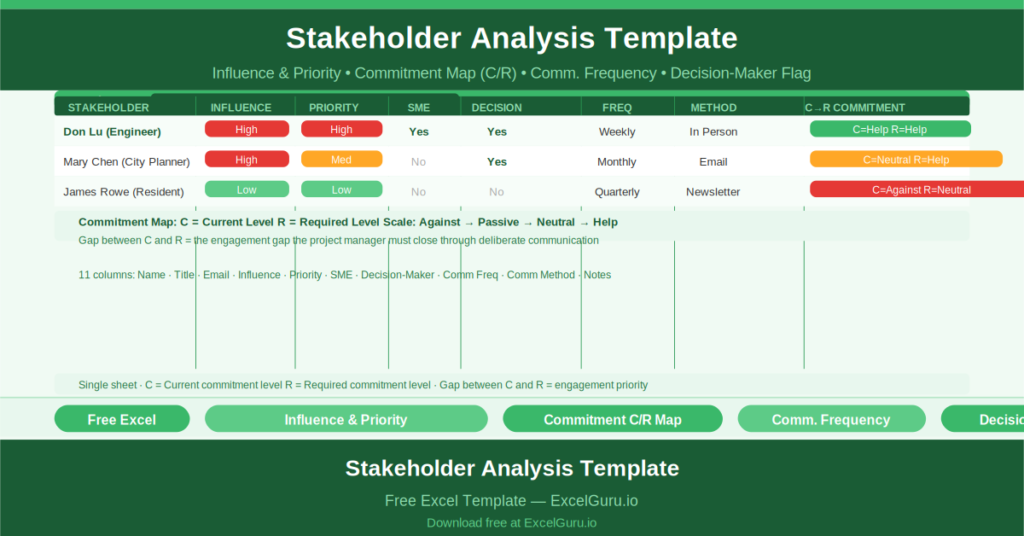
The sample project — Wall St. Pedestrian Walkway, managed by Edith Miser — demonstrates how to use the template with a real stakeholder entry for Don Lu, an Engineer with High influence and High priority.
The Stakeholder Register Columns
Each stakeholder row captures eleven fields:
- Stakeholder: name of the person or group
- Title: their role or position
- Email: contact address
- Influence: how much power they have over the project (High/Medium/Low)
- Priority: how important their engagement is to project success
- SME: whether they are a subject matter expert (Yes/No)
- Decision-Maker: whether they have formal decision authority (Yes/No)
- Freq: how often they should be communicated with (Weekly, Monthly, etc.)
- Method: how to communicate (In Person, Email, Report, etc.)
Don Lu’s entry demonstrates the format: High influence, High priority, SME = Yes, Decision-Maker = Yes, Weekly, In Person.
The Commitment Level Map
The most distinctive feature of this template is the commitment level map. For each stakeholder, two markers record:
- C: Current Level of commitment
- R: Required Level of commitment
Both markers are plotted on a four-point scale: Against — Passive — Neutral — Help. A stakeholder who is currently Neutral (C) but needs to be actively Helping (R) has an engagement gap that the project manager must close through deliberate communication and relationship-building.
This gap between C and R is where stakeholder management happens. The template makes the gap visible for every stakeholder simultaneously.
Who Should Use This Template?
Project managers on any project with complex stakeholder landscapes — construction, IT, change management, public sector — will use the template to plan and track stakeholder engagement systematically rather than reactively.
Change managers and communications leads who are responsible for stakeholder buy-in will use the commitment map to identify which stakeholders need the most attention and tailor their engagement approach accordingly.
Program managers who need to present their stakeholder strategy to governance boards will use the template as the evidence base for their communications plan.
How to Use the Template
Open the workbook. Enter the project details in the header. For each stakeholder, complete all eleven columns. Place the C marker at the stakeholder’s current commitment level and the R marker at the required level. Use the gap between C and R to priorities engagement effort.
Download the free Stakeholder Analysis Template and manage every stakeholder relationship with a plan, not just an instinct.