
A project manager who can’t tell a sponsor the project status in 30 seconds has a visibility problem. A project management dashboard solves that problem by surfacing every critical status indicator in one view.
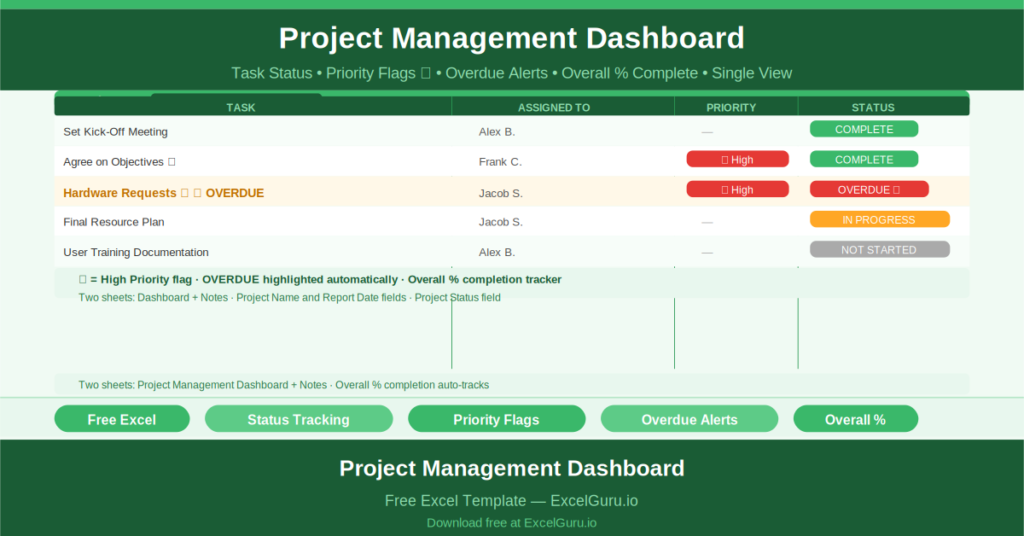
This free Excel Project Management Dashboard Template gives you a single-sheet visual project tracker that shows overall completion percentage, a full task list with assigned owners and priority flags, current project status, and any overdue items — all without a software subscription or complex setup.
Explore Gantt Chart Builder Online for Project Management.
What Is the Project Management Dashboard?
The Project Management Dashboard is a free Microsoft Excel workbook with two sheets: the visual dashboard and a Notes sheet. The dashboard displays all key project metrics in a single, structured view.
Three fields anchor the dashboard: Project Name, Report Date, and Project Status. The Project Status shows the overall health of the project — On Track, At Risk, or Off Track — in plain text with colour coding.
The Task List with Status and Priority
The main body of the dashboard is a task list. Each task row captures:
- Task description: to capture information (basic) related to the task
- Assigned To: the team member responsible
- Priority: flagged with a star (★) for high-priority tasks
- Status: COMPLETE, IN PROGRESS, OVERDUE, or NOT STARTED
The sample tasks demonstrate real-world project tracking. Set Kick-Off Meeting is COMPLETE. Agree on Objectives is COMPLETE with a ★ flag. Hardware Requests is OVERDUE with a ★ priority flag — immediately visible as the highest-urgency item. Final Resource Plan is IN PROGRESS.
Overall Completion Percentage
At the top of the dashboard, an Overall Completion field tracks the percentage of tasks marked COMPLETE. The sample shows 27% completion. As more tasks are updated to COMPLETE status, this figure rises, giving project sponsors and steering committees a single number that represents delivery progress.
Overdue Task Visibility
The OVERDUE status on the Hardware Requests task makes schedule slippage immediately visible without requiring anyone to check dates. When a task is overdue, that status appears in the same list as in-progress and completed tasks — so it cannot be overlooked in a review meeting the way it might be if it lived in a separate risk log.
Who Should Use This Template?
Project managers who need a lightweight, weekly status dashboard that can be shared with sponsors and steering committees will find this template covers the essential reporting requirements without the complexity of a full project management platform.
Team leads who want a shared task tracking view for small teams will use the template as a daily or weekly team meeting reference.
Consultants and freelancers who report project progress to clients will use the dashboard as a professional client-facing update document.
How to Use the Template
Open the workbook. Enter the Project Name, Report Date, and current Project Status. Clear the sample tasks and enter your project’s actual tasks. Assign each task to a team member. Set the initial status to NOT STARTED. Update the Status field as tasks progress. Mark priority tasks with a ★. Review weekly and share with stakeholders.
Download the free Project Management Dashboard Template and give every project meeting a clear, visual status baseline.