
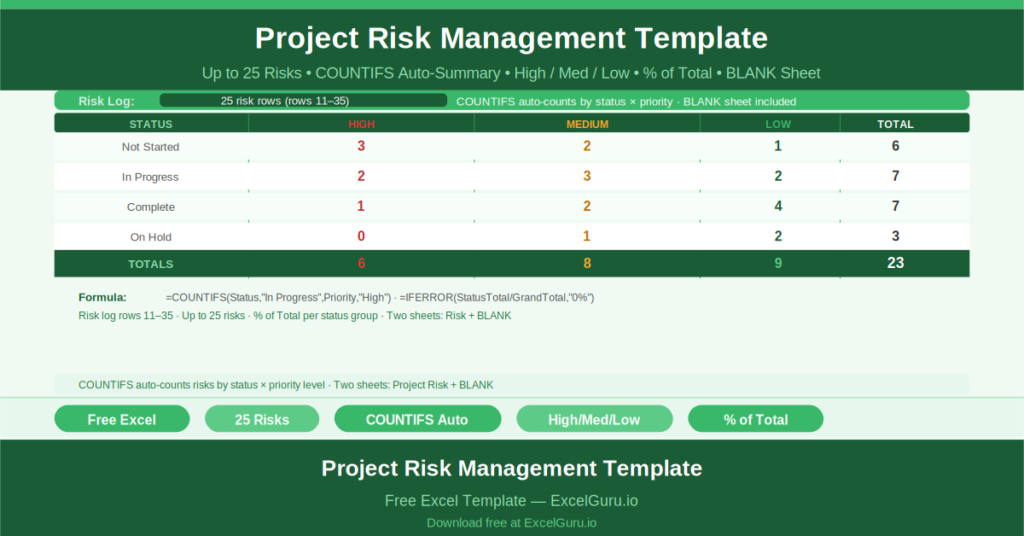
Every project carries risk. The teams that manage risk well are not the ones with fewer risks — they are the ones who have written them down, assigned owners, tracked their progress, and reported on them consistently.
This free Excel Project Risk Management Template gives you a structured risk log for up to 25 risks, a status and priority summary table with automatic COUNTIFS calculations, and a percentage breakdown of risk distribution — all on a single sheet that updates as you update the risk log.
What Is the Project Risk Management Template?
The Project Risk Management Template is a free Microsoft Excel workbook with two sheets: a fully formatted risk management template and a blank version for immediate use.
The template has two sections: a summary table at the top that aggregates risk data automatically, and a risk log below where up to 25 individual risks are recorded.
The Risk Summary Table
The summary table displays risk counts broken down by status and priority level. Rows represent status categories: Not Started, In Progress, Complete, On Hold. Columns represent priority levels: High, Medium, Low.
Each cell uses COUNTIFS to count risks matching both the row status and the column priority level. For example: =COUNTIFS(F11:F35,”In Progress”,G11:G35,”High”) counts all In Progress risks with High priority. A STATUS TOTAL column sums each row. A % OF TOTAL column uses =IFERROR(G3/G8,”0%”) to show each status group as a percentage of all risks.
The Risk Log
The risk log (rows 11 through 35) records each individual risk with fields for description, status, priority level (High, Medium, or Low), and owner. As risks are added or updated, the summary table recalculates automatically.
The log supports up to 25 risks simultaneously. For larger projects, rows can be added and the COUNTIFS ranges extended to cover the expanded row range.
Priority Levels and Status Flow
Risks start as Not Started when first identified. They move to In Progress when mitigations are being implemented. They become Complete when the risk has been resolved or has passed without impact. On Hold indicates a risk that is being monitored but not actively mitigated.
The High/Medium/Low priority classification determines which risks require senior management attention. High priority risks with In Progress status are the ones that need the most frequent review.
Who Should Use This Template?
Project managers responsible for risk reporting to governance boards will use the summary table as the basis for their risk section of the status report — a single glance at the counts and percentages gives the complete risk landscape.
Risk managers and PMO leads who need to monitor risk across multiple projects will maintain one template per project and review them in a weekly or fortnightly risk review session.
Programme managers escalating high-priority risks to sponsors will use the COUNTIFS summary to demonstrate the overall risk profile and the specific risks requiring sponsor-level decisions.
How to Use the Template
Open the BLANK sheet. Enter each identified risk in the risk log: description, status, priority, and owner. The summary table updates automatically. Review the summary in governance meetings. Update risk status as mitigations progress. Add new risks as they emerge during delivery.
Download the free Project Risk Management Template and make every risk visible, tracked, and reported.