
A project status report is not a description of what the project manager did last week. It is a concise, structured account of where the project stands — what has been delivered, what is coming, what is at risk, and whether the project is on track to meet its objectives.
This free Excel Project Status Report Template gives you a complete, single-sheet status report structure covering every section a governance-ready project update requires — from key accomplishments to milestone tracking, all rated with RAG status.
What Is the Project Status Reporting Template?
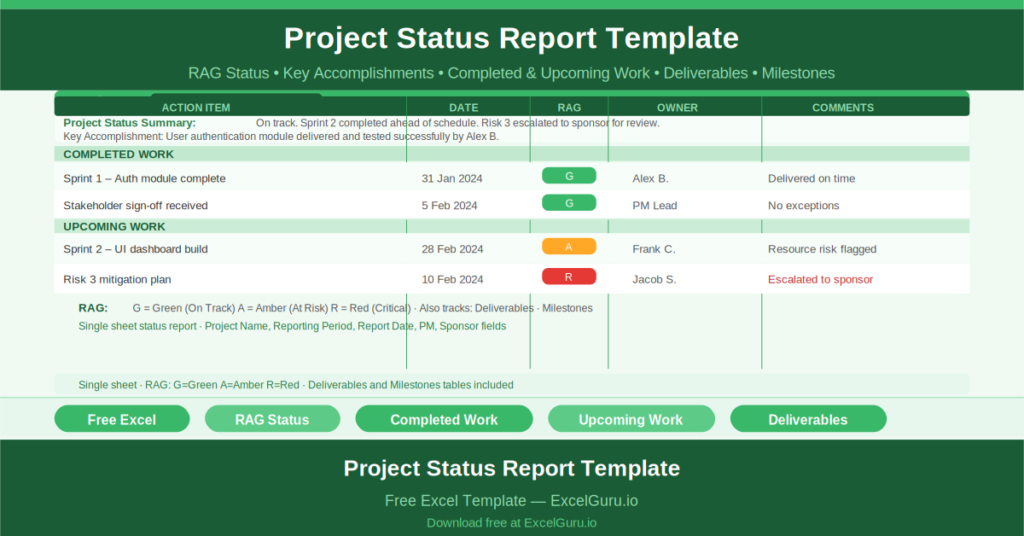
The Project Status Reporting Template is a free Microsoft Excel workbook with a single sheet. It produces a formal, periodic project status report across six structured sections.
The header captures Project Name, Reporting Period, Report Date, Project Manager, and Project Sponsor — identifying the report and its accountability chain for any reader who receives it.
The Six Report Sections
The template organizes the status report into six sections:
- Project Status Summary: a narrative overview of the project’s current position
- Key Accomplishments: the most important achievements since the last report
- Completed Work: a table of action items completed during the reporting period, each with a Date, RAG status, Owner, and Comments
- Upcoming Work: a table of planned actions for the next reporting period, with the same Date, RAG, Owner, and Comments structure
- Project Deliverables: a table of all project deliverables with their target dates, RAG status, owners, and progress comments
- Project Milestones: the same structured table for project milestones
RAG Status Throughout
Every action item, deliverable, and milestone in the template carries a RAG (Red/Amber/Green) status. This consistent rating system means that anyone scanning the report can identify at-risk items immediately — without reading every line.
Green indicates on track. Amber indicates at risk and requiring monitoring. Red indicates a problem requiring escalation or intervention. Using RAG consistently across all sections gives the report a visual grammar that experienced stakeholders read fluently.
Check out Color Palette Picker Online Tool.
Accomplishments vs Upcoming Work
The separation of Completed Work and Upcoming Work into distinct tables is a deliberate structural choice. Completed work demonstrates delivery momentum. Upcoming work shows planning horizon and forward commitment. Together, they give sponsors the backward-looking evidence of delivery and the forward-looking confidence of planning.
Who Should Use This Template?
Project managers producing weekly or fortnightly status reports for sponsors and steering committees will use the template as their standard report format — ensuring consistent structure across every reporting period.
PMO teams who standardize reporting across a portfolio of projects will use the template to enforce a consistent format that makes cross-project comparison straightforward.
Consultants and project leads who report to clients will use the structured format to demonstrate rigor and transparency in their project management approach.
How to Use the Template
Open the workbook. Complete the project header fields. Write the Project Status Summary. List key accomplishments. Complete the Completed Work and Upcoming Work tables for the reporting period. Update the Deliverables and Milestones tables with current RAG status. Review with the project team before distributing to stakeholders.
Download the free Project Status Report Template and make every project update a professional, complete, and consistent document.