
Disciplinary matters are sensitive, and poor records make them riskier. When a case is challenged, memory is no defence; documentation is.
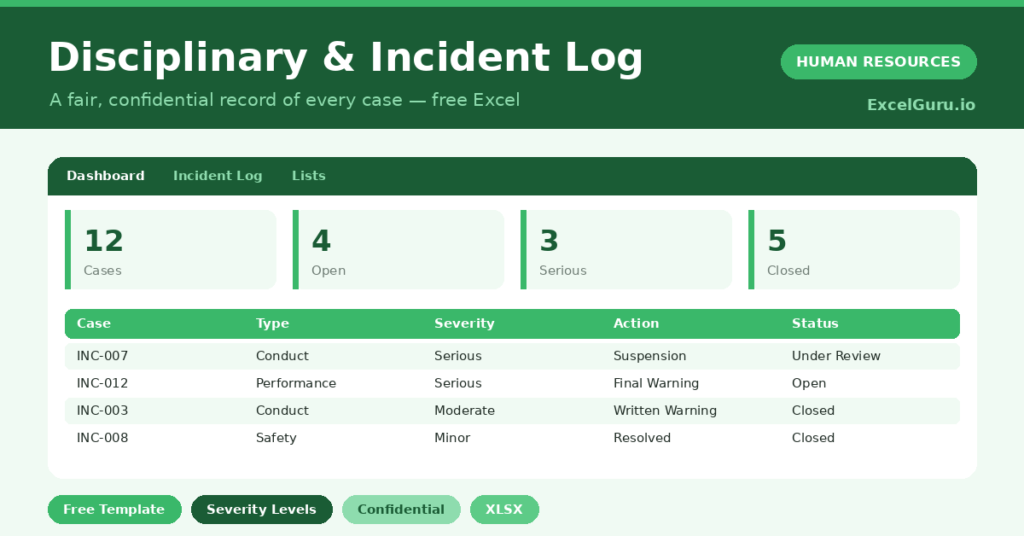
This free disciplinary log keeps a careful, consistent record. You log each case, and the sheet tracks its severity, action and status. You will also find realistic sample data already inside the file. Therefore, you can explore every formula, dropdown and chart first, and then replace the samples with your own records in minutes.
Below, we explain the formulas, the workflow, and how to adapt the log to your own process.
What Is a Disciplinary Log?
A disciplinary log is a structured record of every conduct or incident case. It captures the type, severity, action taken and current status.
It also tracks how long each case stays open. As a result, you have a clear, fair and consistent record when it matters most. Each case sits on its own row, so nothing is lost and the full history stays in one place.
Why Does a Disciplinary Log Matter?
Disciplinary cases carry real legal and human weight. Inconsistent handling or missing records can turn a fair decision into a costly dispute.
A clear log protects everyone involved. Therefore, you can apply your policy consistently and show your working if a case is questioned. Tracking patterns also helps you spot wider issues, such as recurring safety problems. A consistent record is also your best defence if a decision is ever challenged.
Why Use This Template?
A clear log keeps cases fair and consistent. In particular, this one helps you:
- Record every case in one secure place.
- Track type, severity and action taken.
- Monitor open and closed cases.
- See how long cases stay open.
- Spot patterns by type and severity.
What’s Inside the Template?
The workbook has four tabs:
- How to Use — a built-in guide.
- Dashboard — open, closed and severity KPIs.
- Incident Log — one row per case.
- Lists — department, type, severity, action and status dropdowns.
What Formulas Does the Template Use?
The log uses dependable Excel formulas:
| Formula | What it does |
| =IF(Status=”Closed”,””,TODAY()-Date) | Calculates days a case has been open. |
| =COUNTIF(Status,”Open”) | Counts open cases. |
| =COUNTIF(Severity,”Serious”) | Counts serious cases. |
| =COUNTIF(Type, t) | Counts cases by type. |
| =AVERAGEIF(Days Open,”>0″) | Calculates the average days open. |
How Do You Use the Template?
The log is quick to maintain. Just follow these steps:
- Open the Incident Log tab and record each case.
- Enter the date, type and severity.
- Record the action taken.
- Set the status as the case progresses.
- Let the days-open figure calculate.
- Review the breakdown on the Dashboard.
What Are the Best Use Cases?
The log fits many teams, such as:
- HR teams managing disciplinary cases.
- Managers documenting conduct issues.
- Safety teams logging incidents.
- Small businesses without case software.
- Anyone needing a defensible record.
How Can You Modify the Template?
You can tailor it freely. To add detail, insert a column for the investigator or a link to case notes.
You can also adjust the type and action lists to match your policy.
Moreover, the sheet covers 40 cases by default, and you can copy the formula row downward for more.
What Mistakes Should You Avoid?
A few habits weaken the log. Therefore, avoid these common mistakes:
- Recording opinions instead of facts.
- Storing the file without strict access control.
- Handling similar cases inconsistently.
- Leaving cases open without resolution.
Tips to Get the Most From It
- Record only facts, never opinions or assumptions.
- Keep the file strictly confidential and access-controlled.
- Apply your policy consistently across cases.
- Close cases promptly and keep notes clear.
Frequently Asked Questions
Who should have access to this log?
Only authorised HR staff and relevant managers. The data is highly sensitive, so strict access control is essential.
How are days open calculated?
For any case that is not closed, the sheet shows how many days it has run since the date logged. This helps you resolve cases promptly.
Should I record details of each case?
Record factual, objective details and the action taken. For sensitive narratives, link to a securely stored case file rather than typing them here.
Can I track different case types?
Yes. The template separates conduct, attendance, performance, safety and policy cases, and you can adjust these on the Lists tab.
Does it work in Google Sheets?
It does, with minor adjustments to formatting after importing.
Download the Template and Get Started
Fair, consistent handling depends on careful records. This log helps you document every case properly and securely.
Download the Disciplinary & Incident Log Template and keep a fair record today.