
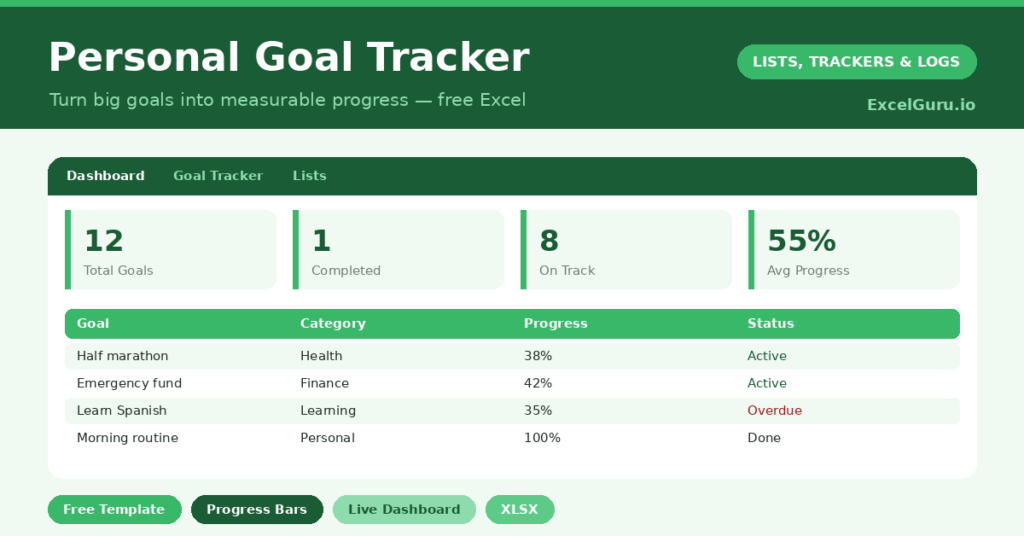
A goal tracker turns a vague wish into a number you can actually chase. “Get fitter” or “save more” feels good for a day. However, without a target and a way to measure it, the resolution quietly fades by February.
This free template fixes that. So you set a start value, a current value and a target, and the sheet works out your progress as a percentage. It also flags whether each goal is on track or slipping, all on a clear dashboard.
What does the goal tracker include?
The template centers on one tracking sheet feeding a progress dashboard. Dropdowns keep your categories and statuses tidy. In short, you get the following:
- A goal table with the goal, category, target date, start value, current value and target value.
- An automatic Progress percentage and a Days Left countdown for every goal.
- Drop-down lists for category and status, so entries stay consistent and filterable.
- Color-coded statuses, so on-track and at-risk goals are obvious at a glance.
- A dashboard showing total goals, those done, on track and at risk, average progress and goals due soon.
Which formulas power the goal tracker?
The progress calculation is cleverer than it looks. It reads =MEDIAN(0,(Current-Start)/(Target-Start),1). So it measures how far you have travelled from your start toward your target.
The MEDIAN wrapper is the smart part. It clamps the result between 0% and 100%, so a goal can never show a negative or an over-100 figure. Meanwhile, Days Left is a simple =Target Date – TODAY(). On the dashboard, COUNTIF tallies your statuses, and a SUMPRODUCT counts the goals due within 30 days. As a result, you always know what needs attention now.
Why use a goal tracker in Excel?
Goals fail for two reasons: they are not measurable, and they are not visible. A spreadsheet fixes both. So you define success as a number, and you keep it in front of you.
Seeing a progress bar creep toward 100% is genuinely motivating, because progress itself is a reward. The format suits fitness goals, savings targets, study plans and work objectives alike. Furthermore, because you own the file, you can review it weekly and adjust as life changes. In short, it keeps your goals alive long after the initial enthusiasm fades.
What does the dashboard reveal?
The dashboard turns a list of goals into a quick status report. The on-track and at-risk counts tell you, at a glance, whether your year is going to plan. The average-progress figure then sums up your overall momentum in a single number.
The goals-due-soon count is the practical one to watch. It surfaces the targets with a deadline in the next 30 days, so nothing creeps up on you. So instead of feeling vaguely behind, you can see exactly which goal needs a push this week. That clarity is what keeps ambition from drifting.
How do you set good goals with it?
The template rewards goals that are specific and measurable. So avoid “read more” and write “read 24 books this year” instead. Give each goal a start value, a target, and a real date.
Then break big goals into a number you can update regularly, such as books read or pounds saved. Because the progress bar moves as you log, you get steady feedback rather than a single distant finish line. Review the dashboard each week, and adjust any target that proves unrealistic. That small ritual keeps the whole list honest and achievable.
How do you customize it?
Edit the categories and statuses on the Lists tab to match your life. For example, you might use *Health*, *Finance*, *Career* and *Learning*. Additionally, you can add a column for why each goal matters, which is a powerful motivator on the hard days. You can also add milestone notes to celebrate progress along the way.
What mistakes should you avoid?
The first mistake is setting too many goals at once. Five focused goals beat fifteen vague ones, so be selective. The second mistake is choosing goals you cannot measure, because the progress bar then has nothing to track.
Finally, do not set and forget. A goal tracker only works if you update the current values regularly. So make a weekly review part of your routine, and the dashboard stays a true reflection of where you stand rather than a hopeful snapshot from January.
Frequently asked questions
How does the goal tracker calculate progress?
It measures how far your current value has moved from the start toward the target, then expresses that as a percentage. A MEDIAN formula clamps the result between 0 and 100, so it never shows an odd negative or over-100 figure.
Can I track different kinds of goals?
Yes. Anything measurable works, whether that is weight, savings, books read or revenue. Just set a start, a current and a target value, and the progress bar does the rest.
Does it remind me of deadlines?
It does. Each goal has a Days Left countdown, and the dashboard counts how many goals fall due within the next 30 days, so deadlines never sneak up on you.
Set a handful of measurable goals, give each a target and a date, and update them weekly. Watch the progress bars climb, and you will feel the pull of momentum. A good goal tracker does not just record your ambitions; instead, it quietly keeps you moving toward them.