
A wedding guest list is mission control for one of the most logistically fiddly days of your life. Between invitations, replies, dietary needs and a seating plan that keeps feuding relatives apart, the details multiply fast.
This free template keeps all of it calm and in one place. So you track every guest, their RSVP, meal choice and table, while the headcount updates itself as replies arrive. As a result, your caterer always has an accurate number, and your seating plan stays under control. So the numbers never spiral into a last-minute guessing game.
What does the wedding guest list include?
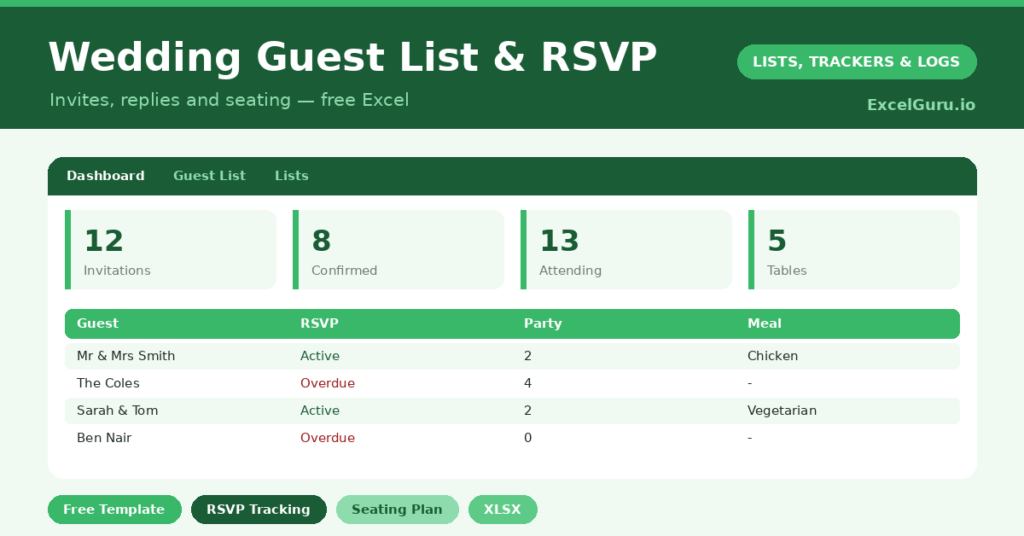
The template pairs a detailed guest list with a dashboard built for planning. Each guest is one row, and dropdowns keep sides, groups, RSVPs and meals tidy. In short, you get the following:
- A guest list with each guest, their side, group, RSVP and number attending.
- A meal choice and a table number, ready for catering and seating.
- Color-coded RSVPs, so confirmed, declined and pending replies are obvious at a glance.
- A dashboard showing confirmations, declines, pending replies, a live attending total and the tables in use, every figure drawn straight from real replies.
How does the wedding guest list track RSVPs?
The headcount is the figure that matters most, and the sheet keeps it honest. Your total attending uses =SUMIF(RSVP, “Yes” ,Number Attending). So it sums the party size only for guests who have actually replied yes.
That is far safer than counting invitations, which always overstates the room. The dashboard also counts confirmations, declines and pending replies with COUNTIF, and it tallies the distinct tables in use. Because everything updates live, your numbers stay accurate from the first reply to the last.
What does the dashboard help you plan?
The dashboard answers the questions you will be asked again and again. Your caterer wants a headcount, and the attending total provides it instantly. Your venue wants to know about tables, and the table count is right there.
The pending figure is the one to watch as the date nears. It is your chase list, the guests who still owe you a reply. So you can follow up the stragglers in good time, rather than guessing numbers in a panic the week before. In short, the dashboard keeps the whole event grounded in real figures.
Why track your guest list in Excel?
Weddings are expensive, and most costs scale directly with the headcount. So an accurate number is not just convenient; it protects your budget. Catering, favors, stationery and table hire all depend on it.
A spreadsheet also gives you flexibility a wedding website often lacks. You can sort, filter and total however you like, and you own the data completely. Furthermore, the meal-choice column means no guest is forgotten when the menus are confirmed. For a busy couple, that control is a real comfort.
How do you customize it?
Edit the sides, groups and meal options on the Lists tab to match your day, adding choices like *Kids* or *Gluten-free*. Additionally, you can add columns for a gift received, a thank-you-sent checkbox, or a plus-one name. Then sort by table to build your seating plan, or filter to *Pending* to chase replies.
What mistakes should you avoid?
The first mistake is counting invitations instead of confirmed guests. Always work from the attending total, which only counts the yes replies. The second is leaving the meal choices blank until the last minute, since caterers usually need them well ahead.
Finally, keep the file backed up and shared with anyone helping to plan. A wedding guest list is too important to live on a single laptop, and too useful to keep to yourself.
How do you handle the final headcount?
As the day nears, the pending list becomes your priority. So, a few weeks out, filter to the guests still marked *Pending* and chase them gently. A quick message usually does it.
Once the replies are in, the attending total is your final number. You confirm it with the caterer, finalize the meal counts from the meal column, and lock the seating by table. Because every figure comes straight from real replies, you can hand over numbers with confidence. In short, the spreadsheet carries the stress so you do not have to.
Frequently asked questions
How does the wedding guest list count attendees?
It sums the number attending only for guests who have replied yes, using a SUMIF formula. So your headcount reflects actual confirmations, not the larger number of invitations sent.
Can I plan the seating with it?
Yes. Each guest has a table number, and the dashboard counts the distinct tables in use. Sort the list by table to see exactly who is sitting where as your plan takes shape.
Does it handle meal choices?
It does. A meal dropdown records each guest’s choice, so when the caterer needs final numbers for each option, you can total them straight from the list in seconds.
Set it up early, update each RSVP as it lands, and keep an eye on the pending list as the day approaches. With the numbers handled, you free up your attention for the part that actually matters: enjoying the celebration you have planned. Weddings are stressful enough without a guest-list mystery hanging over them. So let the spreadsheet hold the details, and keep your own focus on the day itself.