
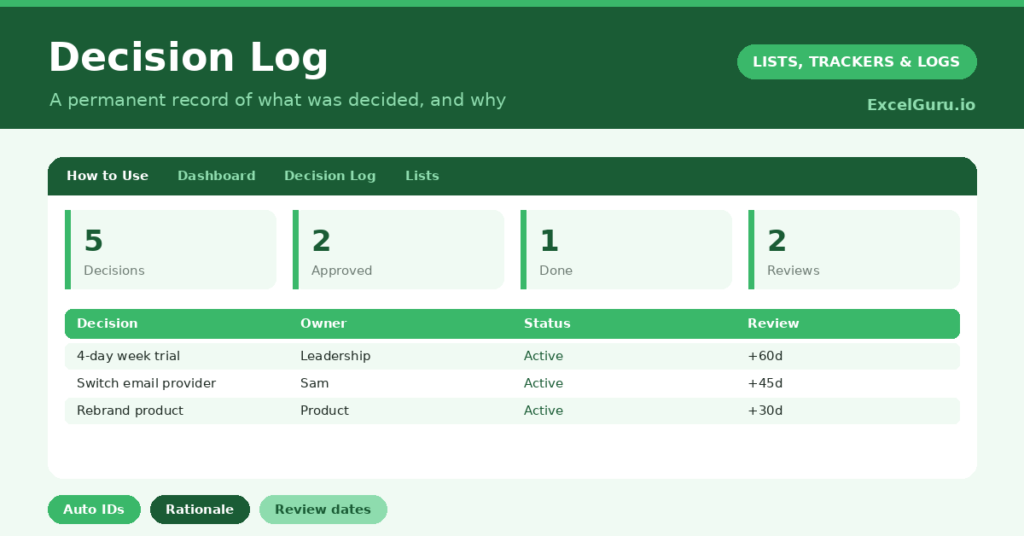
A decision Tracker answers a question that derails countless teams: “wait, why did we decide that?” Teams make decisions in meetings and chats, the reasoning fades, and months later nobody can recall whether a choice was deliberate or accidental. So a written record of what you decided, and why, quietly proves invaluable.
This free template captures each significant decision with its context, owner and status. So it generates an ID automatically and tracks which decisions are due for review. As a result, your reasoning is preserved, accountability is clear, and old choices can be revisited with confidence.
Also, check out –
What does the decision Tracker include?
The template is one Tracker feeding a clear dashboard. Dropdowns keep statuses tidy. In short, you get the following:
- A decision table with an auto-generated ID, date, decision, context or rationale, owner, status and review date.
- Drop-down lists for status, so entries stay consistent and filterable.
- Color-coded statuses, so approved, proposed and superseded decisions are clear at a glance.
- A review-date column, so decisions worth revisiting are not forgotten.
- A dashboard showing total decisions, those approved, implemented, proposed and superseded, plus reviews due soon.
Which formulas power the decision Tracker?
The housekeeping is automatic. Each ID is generated with =IF(Decision=””, “”, “D-“&TEXT(ROW()-3, “000”)), so every decision gets a clean reference like D-001 for easy citation later.
On the dashboard, a series of COUNTIF formulas tally your decisions by status, so you can see how many are approved, implemented or still proposed. A SUMPRODUCT then counts the decisions whose review date falls within the next 30 days. So nothing you meant to revisit quietly slips past its review.
Why keep a decision Tracker?
The value lies in memory and accountability. As memory, the Tracker captures not just the decision but the reasoning behind it, which is the part that always fades. So when circumstances change, you can judge whether the original reason and item still holds.
As accountability, naming an owner for each decision makes clear who is responsible for seeing it through. The Tracker also settles the inevitable later disputes about what the team actually agreed. Furthermore, it is invaluable when new people join, since they can understand past choices without endless explanation. In short, it turns scattered decisions into an institutional memory.
What does the dashboard reveal?
The dashboard gives you a quick read on your decision-making. The status counts show how many decisions you have settled and how many remain in play. So you can see whether the team is actually acting on its proposals.
The reviews-due figure is the practical one to watch, since it flags decisions that deserve a fresh look. Because it counts the review dates falling within 30 days, nothing important drifts unexamined. The superseded count is a useful reminder that decisions evolve. So the dashboard keeps your decision-making both visible and accountable.
How do you use it efficiently?
Tracker a decision as soon as you make it, while the reasoning is fresh. So the context is accurate rather than reconstructed. Write the rationale clearly, because that is the part your future self will thank you for.
Assign an owner, and set a review date for any decision worth revisiting, such as a trial or a temporary policy. Then check the reviews-due figure regularly, and reopen decisions as their dates arrive. Because the Tracker is a living record, it reflects how your thinking has evolved. In short, a little discipline now saves a great deal of confusion later.
How do you customize it?
Edit the statuses on the Lists tab to match your process, adding stages like *On Hold* if you need them. Additionally, you can add columns for the stakeholders consulted, the alternatives considered, or a link to supporting documents. A category column is useful for filtering decisions by area, such as finance or product. The template suits a small team or a whole organization.
What mistakes should you avoid?
The first mistake is recording the decision but not the rationale. The “what” is easy to remember; it is the “why” that matters and that fades, so always capture it. The second mistake is keeping track of only the big decisions.
Many smaller choices are worth recording too, because they often cause the most confusion later. Finally, do not treat the Tracker as write-only. Its power comes from revisiting decisions at their review dates, so make that a habit. A Tracker nobody returns to is just an archive.
Frequently asked questions
What should I record in the decision Tracker?
Capture the decision itself, the date, the owner, and crucially the rationale behind it. The reasoning is the part that fades from memory, so it is the most valuable thing to write down.
How does it track reviews?
Add a review date to any decision worth revisiting, and a SUMPRODUCT counts the reviews due within 30 days on the dashboard. So decisions you meant to reconsider never slip past unnoticed.
Is it useful for a small team?
Very. Even a small team benefits from a shared record of what was decided and why. It settles disputes, helps new joiners understand past choices, and keeps everyone aligned.
Record each decision with its rationale, assign an owner, and set review dates where they matter. The dashboard then keeps your reasoning and reviews in view. A decision Tracker is not bureaucracy; instead, it is the institutional memory that stops a team relitigating the same questions over and over.