
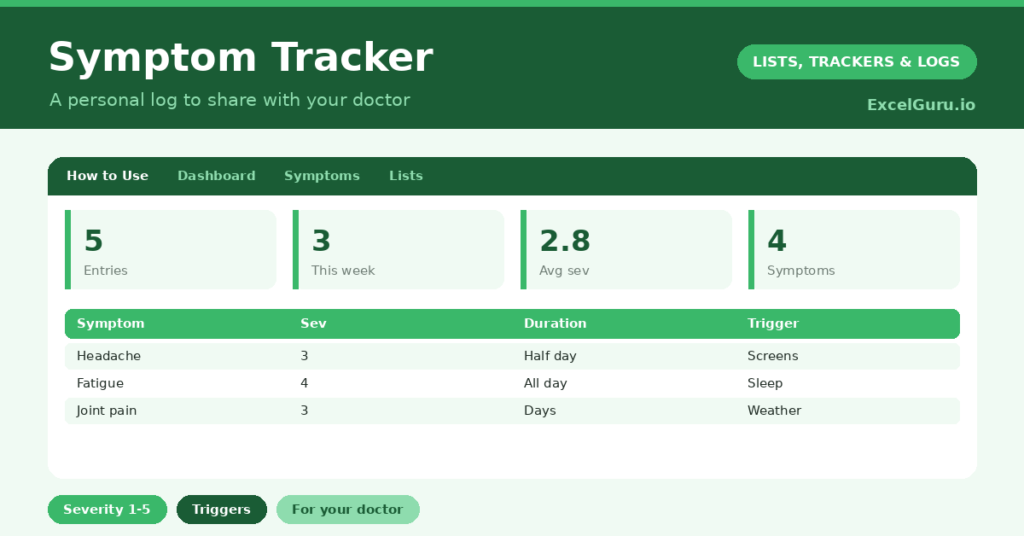
A symptom tracker helps you turn vague, hard-to-recall experiences into a clear record you can actually use. When you see a doctor, “I’ve been getting headaches sometimes” is far less helpful than a dated log showing when they happen, how bad they are, and what came before them. So writing things down as they happen makes a real difference.
This free template lets you log each symptom with its severity, duration and any possible trigger. So patterns you would never spot from memory can gradually emerge. As a result, you have a calm, organized record to share with a healthcare professional.
This is a personal tracking tool to help you notice patterns and have a clearer conversation with your doctor. It is not medical advice, and it cannot diagnose anything. If you are worried about a symptom, or it is severe or persistent, please speak to a qualified healthcare professional.

What does the symptom tracker include?
The template is one symptom log feeding a gentle dashboard. Dropdowns keep severity and duration tidy. In short, you get the following:
- A symptom log with the date, symptom, a severity rating from one to five, duration, possible trigger, action taken and notes.
- Drop-down lists for severity and duration, so entries stay consistent.
- A possible-trigger column, so patterns over time become easier to see.
- An action-taken column, to note what you tried and whether it helped.
- A dashboard showing total entries, this week’s entries, your average severity, the most recent date, distinct symptoms and higher-severity entries.
Which formulas power the symptom tracker?
The dashboard gently summarizes your log without any judgement. A COUNTA totals your entries, and a SUMPRODUCT counts those from the last week, so you can see how active a period has been.
An AVERAGEIF gives your average severity across rated entries, and a MAX shows your most recent date. A SUMPRODUCT then counts the distinct symptoms you have logged. So the dashboard offers a simple overview that can be genuinely useful to share, while the detail stays in the log itself.
Why keep a symptom tracker?
The first reason is better conversations with your doctor. A clear, dated record is far more useful than trying to remember weeks of symptoms in a short appointment. So your healthcare professional has accurate information to work with.
The second reason is spotting patterns. Over time, the possible-trigger column may reveal links you would never notice day to day, such as symptoms following poor sleep or certain foods. The log can also show whether something is improving or worsening. Furthermore, simply writing things down can ease the worry of carrying it all in your head. In short, the tracker supports a calmer, more informed approach to your health.
What does the dashboard reveal?
The dashboard gives a quiet, factual overview rather than any verdict. This week’s entries show how recent activity compares, and the most-recent date keeps the log current at a glance.
The distinct-symptoms count shows the range of what you are noticing, which can be helpful context. The average-severity figure offers a simple sense of how things have been overall. These figures are there to inform a conversation with a professional, not to draw any conclusions on their own. So the dashboard stays gentle and purely descriptive.
How do you use it?
Log a symptom soon after you notice it, while the details are fresh. So your record stays accurate. Rate how severe it felt, note how long it lasted, and jot down anything that might be related, such as food, sleep or stress.
Record any action you took and whether it seemed to help, for your own reference. Then, when you see a doctor, bring the log along so they can see the full picture. Because the record builds over time, patterns become easier to discuss. In short, a few seconds of logging gives you a far clearer story to share.
How do you customize it?
Edit the sample symptoms and duration options on the Lists tab to match what you experience. Additionally, you can add columns for the time of day, any medication taken, or how you were feeling emotionally. A column linking symptoms to specific activities can help reveal triggers. The template adapts to tracking a single recurring issue or several at once.
What mistakes should you avoid?
The first mistake is using the tracker to self-diagnose, which it is not designed for. So treat it as a record to share with a professional, not a substitute for one. The second mistake is logging only the worst days, which gives an incomplete picture.
Record the milder days too, so the pattern is honest. Finally, please do not let tracking become a source of anxiety. If logging symptoms makes you feel worse, it is fine to step back, and to reach out to a healthcare professional or someone you trust for support. Your wellbeing comes first.
Frequently asked questions
Can the symptom tracker diagnose my condition?
No. It is simply a personal record to help you notice patterns and share clear information with your doctor. Any diagnosis or medical advice must come from a qualified healthcare professional.
How does it help my doctor?
It gives them a dated, organized record of your symptoms, their severity and possible triggers, which is far more useful than trying to recall everything during a short appointment.
How often should I log symptoms?
Log them as they happen, including milder days, so the record is complete and honest. If keeping the log ever feels distressing, it is perfectly fine to pause and seek support from a professional or someone you trust.
Log symptoms as they happen, note possible triggers, and bring the record to your appointments. A symptom tracker cannot diagnose anything, and it is no replacement for professional care, but it can help you and your doctor have a clearer, more useful conversation about how you have been feeling.