
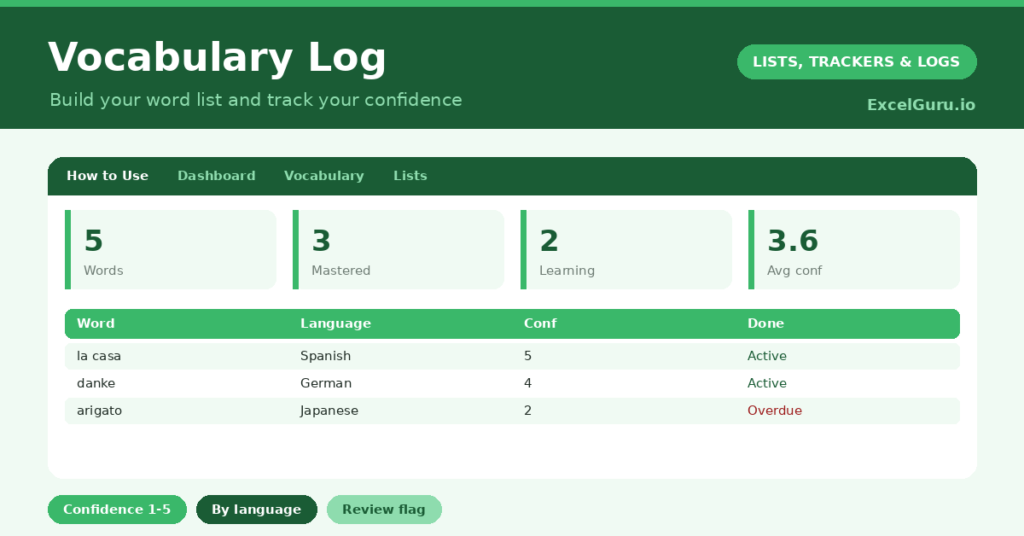
A vocabulary log is one of the most effective tools a language learner can keep, because vocabulary is built one word at a time. You meet a useful word, understand it in the moment, and then forget it within days. So a personal record of new words, with a way to track how well you know each one, makes all the difference.
This free template records each word with its meaning and an example, and a confidence rating from one to five. So it shows which words you have mastered and which still need work. As a result, your revision targets the words that will actually move your learning forward.
What does the vocabulary log include?
The template is one word list feeding a clear dashboard. Dropdowns keep languages and ratings tidy. In short, you get the following:
- A word list with the word or phrase, language, meaning, example sentence, date added, a confidence rating and a reviewed flag.
- Drop-down lists for language, confidence and a reviewed flag, so entries stay consistent.
- An example-sentence column, since words stick far better in context.
- Colour-coding on the reviewed flag, so you can see what you have revised.
- A dashboard showing total words, those mastered, those still learning, your average confidence, words added this week and words reviewed.

Which formulas power the vocabulary log?
The dashboard turns your list into a study plan. A SUMPRODUCT counts the words rated four or five as mastered, and another counts those below four as still learning. So you can see your progress at a glance.
An AVERAGEIF gives your average confidence across all rated words, and a SUMPRODUCT counts the words you added this week, which shows your momentum. A COUNTIF totals the words you have reviewed. So the log tells you not just how many words you have collected, but how well you actually know them.
Why keep a vocabulary log? Is it required?
The first benefit is beating the forgetting curve. New words fade quickly without review, but a log keeps them in front of you. So you revisit and reinforce them before they slip away.
The second benefit is focused revision. The confidence rating is the clever part, because it stops you wasting time on words you already know. Instead, you concentrate on the low-confidence words that will raise your fluency. The example sentences help the words stick in context. Furthermore, watching your mastered count grow is genuinely motivating. In short, the log makes your learning efficient as well as consistent.
What does the dashboard reveal?
The dashboard shows your learning at a glance. The mastered count is the satisfying one, growing steadily as words move from shaky to secure. So it is a clear measure of progress.
The still-learning count is your revision to-do list, pointing at the words that need attention. The added-this-week figure shows your momentum in collecting new vocabulary. The average confidence gives an overall sense of how well your list has settled in. Because it all updates as you rate words, the picture stays current. So the dashboard keeps your study focused and motivating.
How do you use vocabulary log in Excel?
Whenever you meet a useful new word, add it with its meaning and an example sentence. So you capture it before it fades. Rate your starting confidence honestly, even when the low scores feel uncomfortable.
Then revise regularly, focusing on the low-confidence words, and update each rating as it improves. Mark words as reviewed so you can track your coverage. Because the mastered count rises as you work, your progress stays visible and motivating. In short, capture new words promptly and revise the weak ones, and your vocabulary will steadily grow.
How do you customize it?
Edit the languages on the Lists tab to match what you are learning. Additionally, you can add columns for the part of speech, a pronunciation guide, or the source where you met the word. A column for a second confidence check, taken later, shows how much you have improved. The template suits a single language or several at once.
What mistakes should you avoid?
The first mistake is rating your confidence too generously, which hides the words that need work. So be honest, because the log only helps if it tells the truth. The second mistake is collecting words but never revising them.
A word list you never revisit is just a museum, so review the low-confidence words regularly. Finally, do not skip the example sentences. Words learned in context stick far better than words memorised in isolation, so a good example is worth the extra moment. Context is what turns a word into part of your fluency.
Frequently asked questions
How does the vocabulary log help me revise?
It tracks a confidence rating for every word and counts how many are still low. So you can focus your revision on the words you do not yet know well, rather than the ones you have already mastered.
Should I add example sentences?
Yes, it really helps. Words learned in context stick far better than isolated definitions, so a short example sentence makes each word easier to recall and to use correctly.
Can I track more than one language?
Yes. Each word carries its language, and you can filter or sort by it. The confidence and dashboard formulas work the same way whether you study one language or several.
Capture new words with examples, rate your confidence honestly, and revise the weak ones regularly. The dashboard then shows your mastery growing. A vocabulary log will not learn the words for you, yet it makes sure the useful ones stick, and it points your revision exactly where it will do the most good.