
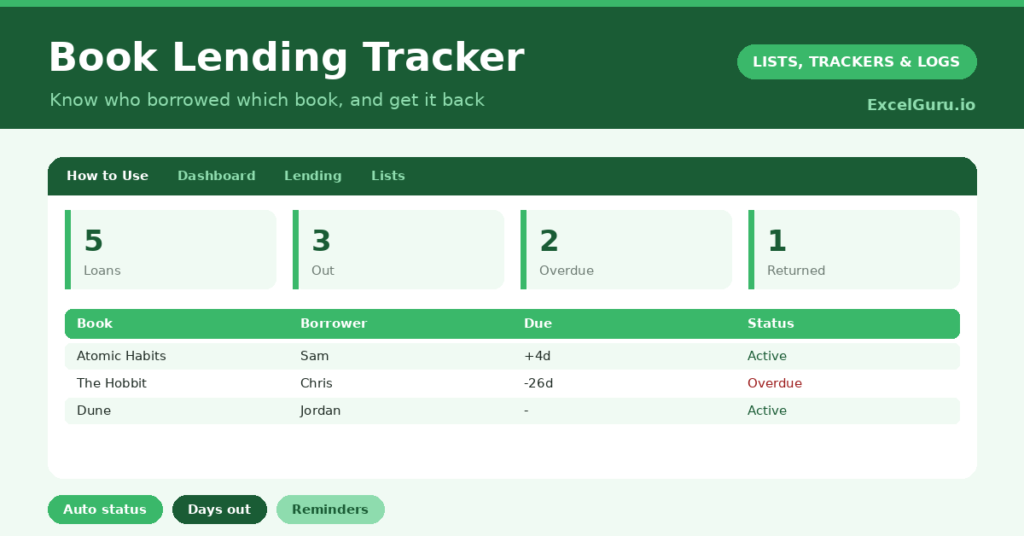
A book lending tracker solves the small heartbreak every book lover knows: lending a favourite book and never seeing it again. We lend generously, forget who has what, and slowly our shelves develop mysterious gaps. So a simple record of who borrowed which book, and when it is due back, keeps your library intact.
This free template logs each loan with the borrower and a due-back date. So it works out an automatic status and counts how long each book has been out. As a result, you always know where your books are, and a friendly reminder is easy to send.
What does the book lending tracker include?
The template is one loan log feeding a clear dashboard. A dropdown keeps the returned flag tidy. In short, you get the following:
- A loan log with the book, borrower, lent date, due date, a returned flag, days out and status.
- An automatic status reading Out, Overdue or Returned for every book.
- An automatic Days Out count for books still on loan.
- Colour-coded statuses, so overdue books stand out in red.
- A dashboard showing total loans, books out, overdue books, returns, distinct borrowers and the longest loan.

Note – Dates shown in the image can be changed. Use CTRL+SHIFT+3 in Windows.
Which formulas power the book lending tracker?
Two formulas keep the log honest. The status uses a nested IF: if you have marked a book returned it reads Returned, if its due date has passed it reads Overdue, otherwise it reads Out. So the state of every book is obvious at a glance.
The Days Out column is =IF(OR(Lent=””, Returned=”Yes”), “”, TODAY()-Lent), so it counts only while a book is genuinely on loan. On the dashboard, COUNTIF tallies the statuses, a SUMPRODUCT counts distinct borrowers, and a MAX finds the longest loan. So the dashboard surfaces exactly which books to chase.
Why use a book lending tracker?
The obvious reason is keeping your collection whole. Lent books that are forgotten rarely come back, and a tracker gently prevents that. So you can lend freely without losing your favourites.
It also takes the awkwardness out of asking for a book back. With a clear date and a days-out count, a reminder feels factual rather than accusing. The log even shows your most enthusiastic borrowers over time. Furthermore, it works just as well for a community library, a classroom or an office bookshelf. In short, it lets you be generous and still keep your shelves complete.
What does the dashboard reveal?
The dashboard gives you an instant read on your lent books. The overdue count is the one to act on, since those books need a gentle nudge. The books-out count shows how many are in circulation.
The distinct-borrowers figure hints at how widely your books travel, and the longest-loan figure flags the book that has been out worryingly long. Because the statuses update automatically, you never have to scan the whole log to find a problem. So the dashboard turns a list of loans into a simple reminder list. It keeps your library coming home.
How do you use it?
Log each loan when it happens, recording the book, the borrower and a due-back date. So nothing leaves untracked. The status then takes care of itself as time passes.
When a book comes back, set the returned flag to Yes, which stops the days-out counter. Check the dashboard now and then, and send a friendly reminder for anything overdue. Because every loan is captured, you always know exactly where your books are. In short, a few seconds at each loan keeps your whole collection accounted for.
How do you customize it?
Edit the borrower list to match your circle. Additionally, you can add columns for the book’s genre, its condition when lent, or a contact detail for the borrower. A column noting whether a book is especially treasured helps you lend those more carefully. The template suits a personal library, a book club, a classroom or a small community lending shelf.
What mistakes should you avoid?
The first mistake is logging the loan but forgetting to mark the return. The log then shows books as out long after they are back, which erodes trust in it. So close the loop every time. The second mistake is leaving the due date blank, since the overdue status depends on it.
Always set a return date, even a relaxed one. Finally, do not feel awkward about sending reminders. The whole point of the tracker is the gentle nudge that brings a book home, and most borrowers simply forgot. A friendly prompt is what keeps your collection complete.
Frequently asked questions
How does the book lending tracker know what is overdue?
A nested IF compares each book’s due date with today. If the date has passed and the book is not yet returned, the status reads Overdue, and the dashboard counts those books for you.
Can I use it for a classroom or club?
Yes. It works just as well for a classroom, book club or office shelf as for a personal library. Log each loan with the borrower, and the status and dashboard track everything the same way.
How do I see who has had a book longest?
The dashboard shows the longest current loan in days. To see everything one person holds, simply filter the borrower column by their name.
Log each loan, mark returns, and send a friendly nudge for anything overdue. The status and days-out columns do the watching for you. A book lending tracker lets you share your books as generously as you like, while making sure your favourites always find their way back to your shelves.