
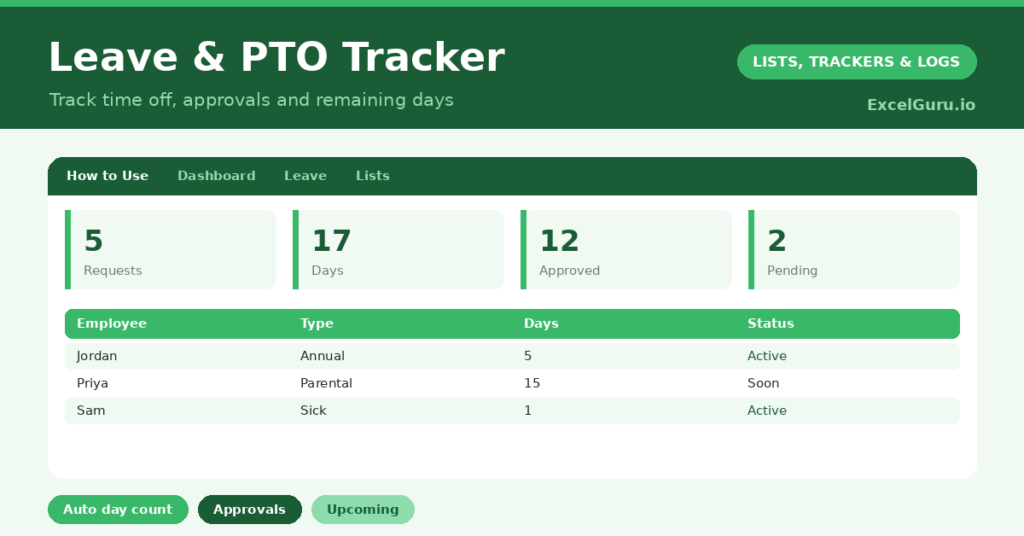
A leave tracker keeps time off organised, whether you manage a small team or just want to plan your own holidays. Annual leave, sick days and parental leave quickly become hard to keep straight, and a forgotten booking or an over-allocated week causes real headaches. So a single record of every request, with the days counted for you, saves a lot of confusion.
This free template logs each leave request by type and works out the days automatically. So it tracks approvals and shows upcoming time off. As a result, you always know who is off when, how many days have been taken, and what is still awaiting sign-off.
What does the leave tracker include?
The template is one leave log feeding a clear dashboard. Dropdowns keep types and statuses tidy. In short, you get the following:
- A leave log with the employee, type, start date, end date, an auto-calculated days figure, status and notes.
- An automatic days count for every request, including both ends.
- Drop-down lists for type and status, so entries stay consistent.
- Colour-coded statuses, so approved, pending and rejected requests stand out.
- A dashboard showing total requests, total days, approved days, pending requests, distinct employees and upcoming leave.

Which formulas power the leave tracker?
The template handles the day-counting for you. Each request’s days figure is =End Date – Start Date + 1, so leave from Monday to Friday correctly shows five days. That small plus-one keeps the totals honest.
On the dashboard, a SUM totals all leave days, and a pair of SUMIF formulas add up the days that are approved or taken. A COUNTIF counts pending requests awaiting a decision, and a SUMPRODUCT counts upcoming leave that starts in the future. So the tracker turns a list of requests into the totals a planner needs.
Why use a leave tracker?
The first benefit is avoiding clashes. Seeing everyone’s booked leave in one place lets you spot when too many people are off at once. So you can plan cover before it becomes a problem.
The second benefit is accurate records. Tracking days taken against each person keeps allowances fair and makes payroll and planning easier. The status column gives a clear record of what has been approved. Furthermore, the upcoming-leave view helps you prepare for absences in good time. In short, the tracker keeps time off fair, planned and free of nasty surprises.
What does the dashboard reveal?
The dashboard gives a clear overview of time off. The pending count is the one that needs action, since those requests are waiting on a decision. So it is your approval to-do list.
The approved-days figure shows how much leave you have committed, useful for planning cover. The upcoming count flags absences on the horizon, so nothing catches you out. The distinct-employees figure shows how many people are involved. Because it all updates as you log requests, the picture stays current. So the dashboard keeps leave planning under control.
How do you use it?
Log each request as it comes in, with the employee, type and dates. So you miss nothing. The days calculate themselves, and you set the status to Pending until you make a decision.
Then move each request to Approved, Rejected or Taken as it progresses. Check the dashboard regularly to clear pending requests and to see upcoming absences. Because you capture every request, you can plan cover and keep allowances fair. In short, log requests as they arrive and keep statuses current, and your leave planning stays effortless.
How do you customize it?
Edit the leave types, statuses and sample employees on the Lists tab to match your team. Additionally, you can add columns for each person’s annual allowance, the days remaining, or who approved a request. A column for the team or department helps in a larger organisation. The template suits a sole trader planning holidays or a small team managing shared cover.
What mistakes should you avoid?
The first mistake is logging the dates but leaving the status as Pending forever, so the dashboard never reflects reality. So update each request once you decide it. The second mistake is forgetting to log informal or last-minute absences.
An incomplete record cannot plan cover reliably, so log every absence as it happens. Finally, do not rely on memory for who is off next week. The upcoming view exists precisely so you do not have to, so check it before planning. A complete, current log is what makes the planning trustworthy.
Frequently asked questions
How does the leave tracker count the days?
Each request’s days figure is the end date minus the start date plus one, so leave from Monday to Friday correctly shows five days. The dashboard then totals the days across all requests.
Can it track a whole team?
Yes. Log each person’s requests with their name, and the dashboard counts distinct employees and totals everyone’s leave. You can also add an allowance column to track days remaining per person.
Does it show upcoming time off?
Yes. The dashboard counts requests that start in the future, so you can see absences on the horizon and arrange cover well before anyone is away.
Log each request, let the days calculate, and keep statuses current. The dashboard then shows pending approvals and upcoming leave at a glance. A leave tracker keeps time off fair, planned and visible, so absences never clash unexpectedly and everyone knows exactly where they stand.