
An event planning checklist is the difference between an event that runs smoothly and one that lurches from one forgotten detail to the next. Whether it is a wedding, a party or a work function, the number of moving parts is genuinely daunting. So a single organised list, with owners, dates and costs, is what keeps the whole thing under control.
This free template breaks your event into tasks by category, each with an owner and a due date. So it counts down to every deadline and tracks your spending. As a result, nothing slips through the cracks, and you arrive at the big day calm and on budget.
What does the event planning checklist include?
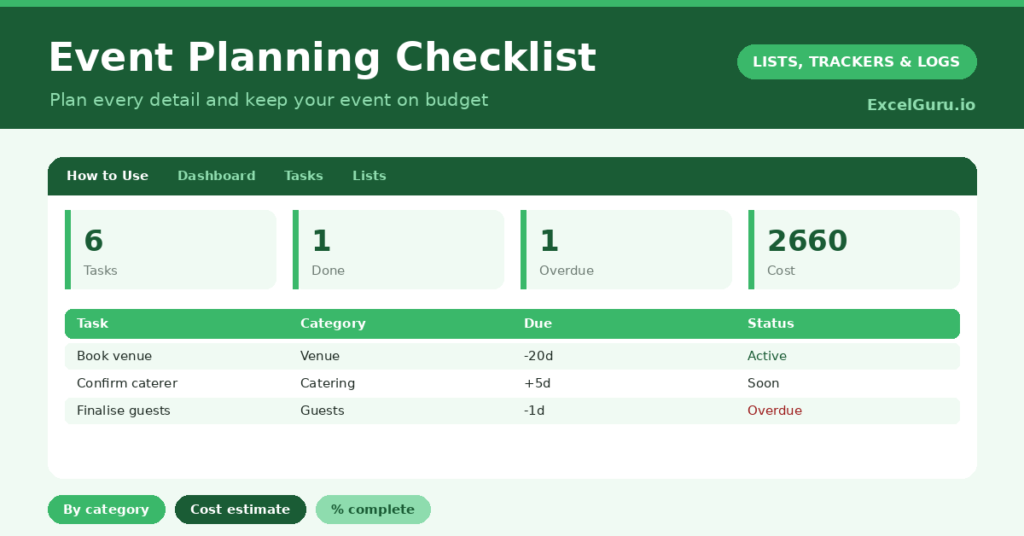
The template is one task list feeding a clear dashboard. Dropdowns keep categories and statuses tidy. In short, you get the following:
- A task list with the task, category, owner, due date, status, days left, cost estimate and notes.
- An automatic Days Left countdown that clears once a task is done.
- Drop-down lists for category and status, so entries stay consistent.
- A cost-estimate column, so the running total keeps your event on budget.
- A dashboard showing total tasks, those done, those to do, overdue tasks, your total estimated cost and your percent complete.

Which formulas power the event planning checklist?
The dashboard turns your list into a plan. The Days Left column is =IF(OR(Due=””, Status=”Done”), “”, Due – TODAY()), so it counts down to each task and blanks out once it is finished.
A SUMPRODUCT flags overdue tasks, which is your urgent list, and a SUM of the cost column gives your running budget total. The percent complete is =COUNTIF(Status, “Done”) / COUNTA(tasks), so you watch a single, reassuring number climb toward the event. So the dashboard shows both what is pressing and how far you have come.
Why use an event planning checklist?
Events are stressful mainly because there is so much to remember, across so long a timeline. A checklist hands that mental load to the spreadsheet. So you stop lying awake wondering whether you confirmed the caterer.
The owner column is invaluable when others are helping, since it makes clear who is doing what. The cost estimates keep the budget visible, which is where events most often go wrong. The categories group the work logically, from venue to decor. Furthermore, the percent-complete figure is genuinely reassuring as the day approaches. In short, the checklist turns event chaos into calm control.
What does the dashboard reveal?
The dashboard answers the planner’s constant question: are we on track? The overdue count is the first thing to check, since those tasks need attention now. The to-do count shows how much still lies ahead.
The total-cost figure keeps your budget honest, gathering every estimate into one number. The percent-complete figure is the motivating one, climbing steadily toward the event. Because it all updates automatically, a glance tells you whether the event is under control. So the dashboard keeps a complex undertaking feeling manageable.

How do you use it?
Start early by listing every task you can think of, grouped into categories and given sensible due dates. So the whole event is mapped from the outset. Assign owners if others are helping, and add a cost estimate to each task.
Then work through the list, updating statuses as you go and adding tasks as they occur to you. Check the dashboard regularly, clearing overdue and due-soon items first. Because the costs add up automatically, you always know where the budget stands. In short, starting early and updating often is the whole secret to a smooth event.
How do you customise it?
Edit the categories and statuses on the Lists tab to match your event, adding categories like *Entertainment* or *Photography*. Additionally, you can add columns for the actual cost against the estimate, a supplier’s contact, or a deposit-paid flag. A column for a task’s priority is useful for a packed schedule. The template suits a small gathering or a large, complex celebration.
What mistakes should you avoid?
The first mistake is starting too late, which is how tasks pile into a last-minute panic. So begin the checklist as soon as the event is confirmed. The second mistake is leaving tasks unassigned when others are helping.
A clear owner means a task actually gets done. Finally, do not skip the cost estimates. They are what keep the budget under control, so a celebration does not come with a financial hangover. A quick estimate per task is what keeps the spending in check.
Frequently asked questions
How far ahead should I start the event planning checklist?
As early as possible. Many tasks, like booking a venue or caterer, have long lead times, and the days-left countdown keeps those early jobs visible so nothing is left too late.
Can several people share the planning?
Yes. Keep the file in a shared location and assign each task an owner. Everyone then sees the same live list of what is done and who is responsible for what.
Does it help with the budget?
Yes. Each task carries a cost estimate, and the dashboard sums them into a running total. So you can see the full cost of your event taking shape and keep it under control.
List every task early, set owners, dates and costs, and update your progress as you go. The dashboard then keeps overdue tasks and your budget in clear view. An event planning checklist will not pour the drinks, yet it turns the chaos of organising an event into a calm, ordered countdown to a day that runs beautifully.