
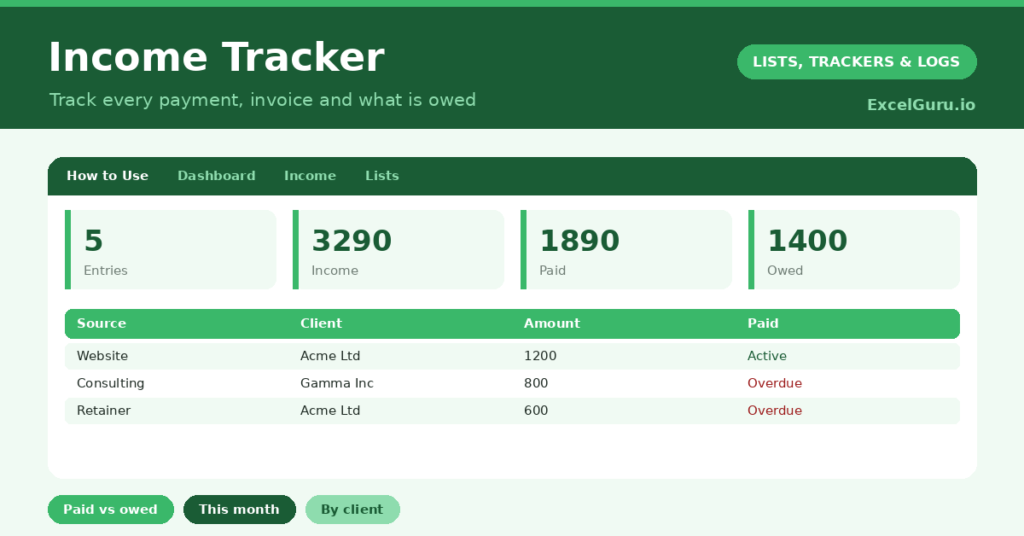
An income tracker is essential for anyone whose money comes in irregularly, from freelancing, a side business or several sources at once. Unlike a single salary, varied income is genuinely hard to keep on top of, and it is easy to lose track of what you have earned and, crucially, what you are still owed. So a single record of every payment is invaluable.
This free template lets you log each payment by client and source, and track whether it has been invoiced and paid. So it totals your income and what is outstanding. As a result, you always know what you have earned, what is owed, and who you need to chase.
What does the income tracker include?
The template is one income log feeding a clear dashboard. Dropdowns keep types and the invoiced and paid flags tidy. In short, you get the following:
- An income log with the date, source, client, amount, type, an invoiced flag and a paid flag.
- Drop-down lists for type and the invoiced and paid flags, so entries stay consistent.
- Colour-coding on the paid flag, so unpaid income stands out.
- A client column, so you can see which clients bring in the most.
- A dashboard showing total entries, total income, this month’s income, the amount paid, the amount outstanding and your number of clients.

Which formulas power the income tracker?
The dashboard does the totalling for you. A SUM of the amount column gives your total income, and a SUMPRODUCT totals just this month’s earnings by checking each date against today.
A SUMIF totals the income marked paid, and another totals what is still outstanding, which is exactly the figure you need when chasing payment. A SUMPRODUCT counts your distinct clients. So the tracker turns a list of payments into a clear picture of what you have earned and what is still owed.
Why use an income tracker?
The first benefit is knowing what you are owed. With irregular income, unpaid invoices are easily forgotten, and forgotten invoices are money lost. The outstanding figure makes sure you chase every payment. So you actually collect what you have earned.
The second benefit is clarity for planning and tax. Seeing your total and monthly income helps you budget on a variable wage, and a clear record makes tax time far simpler. Tracking income by client shows where your work really comes from. Furthermore, watching your income build is genuinely motivating. In short, the tracker keeps irregular income organised and fully collected.
What does the dashboard reveal?
The dashboard gives you a clear read on your earnings. The outstanding figure is the one that matters most, since it is money you have earned but not yet received. So it tells you exactly how much to chase.
The this-month figure shows your recent earnings, useful for budgeting on a variable income. The paid figure confirms what has actually landed, and the total income shows your overall picture. The client count hints at how concentrated your work is. Because it all updates as you log payments, the picture stays current. So the dashboard keeps your income visible and collected.

How do you use it?
Log each payment as you earn or invoice it, with the client, source and amount. So nothing is forgotten. Mark whether you have invoiced it and whether it has been paid, which is the key to tracking what is owed.
As payments arrive, update the paid flag, and the outstanding figure adjusts. Check the dashboard regularly, and chase anything still unpaid. At tax time, your full record is ready and waiting. Because every payment is captured, you always know your position and never let an invoice slip. In short, log as you go and keep the paid flags current.
How do you customize it?
Edit the types and sample clients on the Lists tab to match your work. Additionally, you can add columns for an invoice number, the due date for payment, or a calculated days-overdue figure for unpaid invoices. A column for tax set aside is useful for the self-employed. The template suits a freelancer, a side business, or anyone with several income streams.
What mistakes should you avoid?
The first mistake is logging the income but not tracking the paid flag, which is the whole point for chasing payment. So update it every time. The second mistake is only logging the big payments and skipping the small ones.
An accurate total needs every payment, so capture them all. Finally, do not leave logging until tax season, when memory has faded. Income recorded as it arrives is accurate and complete, while a year reconstructed from memory is a stressful guess. Timely entries are what make the totals worth trusting.
Frequently asked questions
How does the income tracker show what I am owed?
It totals the income marked as unpaid with a SUMIF, giving your outstanding figure. So you can see exactly how much you have earned but not yet received, and chase the clients who owe it.
Can it track income from several clients?
Yes. Each payment carries its client, and the dashboard counts your distinct clients. You can filter by client to see who brings in the most and which work is most valuable to you.
Is it useful for tax?
Very. A complete, dated record of your income makes preparing a tax return far simpler. You can add a column for tax set aside, which helps the self-employed avoid a nasty bill at year-end.
Log every payment, track what is invoiced and paid, and check the dashboard for what is outstanding. An income tracker keeps irregular earnings organised, makes sure you collect every invoice, and gives you a clear, tax-ready record of exactly what you have earned across the year.