
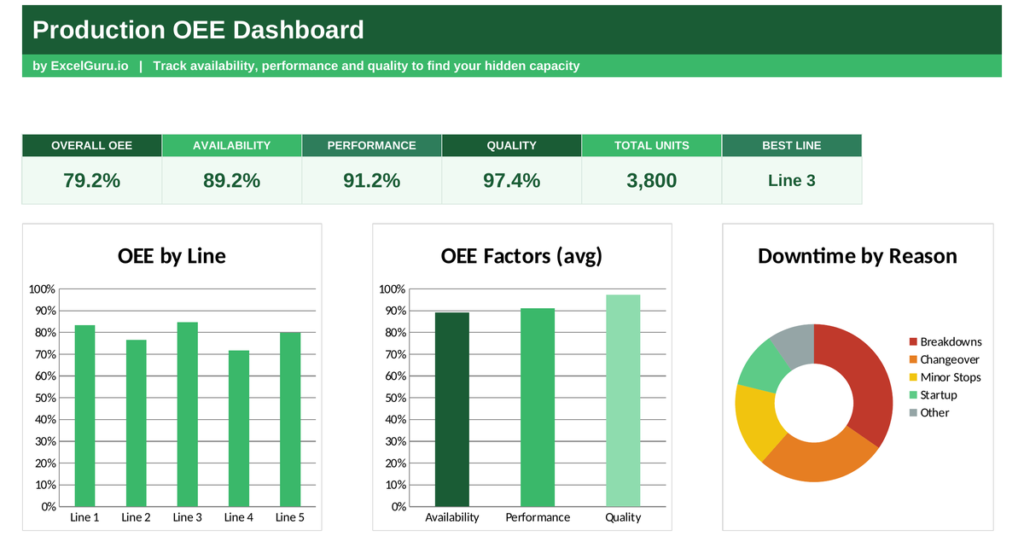
A production line can run all shift and still waste nearly half of what it could make. Short stops, slow cycles and scrapped parts drain output that a simple unit count never reveals. An OEE dashboard measures that lost potential and turns it into one honest number. This free Excel template calculates Overall Equipment Effectiveness for every line, shows the exact formula behind it, and reveals where your capacity leaks away.
Below, you will find what OEE means, the precise formula for each factor, and how the template works out every figure. So by the end you can both read the score and trust the maths behind it.
What is OEE?
OEE stands for Overall Equipment Effectiveness. It is the standard manufacturing metric for how effectively a machine is used compared with its full potential.
The measure grew out of Total Productive Maintenance, the Japanese equipment-management method developed by Seiichi Nakajima. It answers one question: of all the good parts this line could have made at full speed with no stops, what share did it actually produce?
OEE rolls three separate losses into a single percentage. A score of 100% would mean the line made only good parts, as fast as it was designed to run, with no stopped time at all. In practice, most plants land far lower. Around 85% is considered world-class, 60% is fairly typical, and anything near 40% signals serious hidden waste. So the number is both a benchmark and a to-do list.
The OEE formula explained
OEE multiplies three factors together. Each one captures a different kind of loss, and the formula is simply:
OEE = Availability × Performance × Quality
Availability measures stop losses. You calculate it as run time divided by planned production time, where run time is planned time minus all downtime. So it captures breakdowns, changeovers and setup. If a line is scheduled for 480 minutes but loses 40 to downtime, it runs 440, and availability is 440 ÷ 480, or 91.7%.
Performance measures speed losses. You calculate it as the total count divided by run time, then divided by the ideal run rate. In short, it compares how fast the line actually ran with how fast it should run. So it catches small stops and slow cycles that a stopwatch would miss.
Quality measures defect losses. You calculate it as the good count divided by the total count. So it strips out scrap and rework, because a part that fails inspection never counts toward useful output. If a line makes 820 parts and 800 pass, quality is 800 ÷ 820, or 97.6%.
What an OEE dashboard measures
A raw production count flatters every line, because it hides the losses behind the total. OEE refuses to let them hide.
Manufacturers call the wasted potential the hidden factory. A line running at 60% OEE holds roughly 40% more capacity, waiting behind stops, slow speed and scrap. Because the three factors multiply, one strong factor cannot mask a weak one. A line with 95% availability still scores poorly overall once slow running and defects are counted. So the OEE dashboard keeps every kind of loss visible in one number.
How the OEE dashboard calculates your score
The template does every calculation with plain, transparent formulas you can inspect. Each line occupies one row, and the workbook builds the score column by column.
First it finds run time in column D with =B3-C3, subtracting downtime from planned time. Then availability appears in column H as =D3/B3, dividing run time by planned time. Performance sits in column I as =F3/(E3*D3), the total units over the ideal rate multiplied by run time. Quality follows in column J as =G3/F3, the good units over the total. Finally OEE lands in column K as =H3*I3*J3, multiplying the three factors.
The dashboard then rolls the lines up. The overall OEE card uses =AVERAGE(‘Line Data’!K3:K7), and each factor card averages its own column the same way. To name your strongest line, the best-line card uses INDEX and MATCH on the highest OEE. So every headline figure traces straight back to the line data, and changing one input updates the whole score.
A worked OEE calculation
Walk through one line and the maths becomes concrete. Refer the screenshot below (which comes pre-populated in the template file);
Take a line planned for 480 minutes that loses 40 to downtime and runs at an ideal rate of two parts per minute.
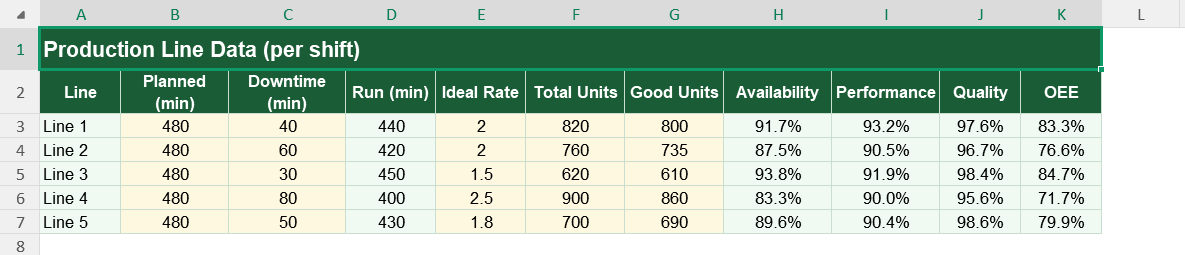
- Its run time is 440 minutes, so availability is 440 ÷ 480, or 91.7%.
- It produces 820 parts, so performance is 820 ÷ (2.0 × 440), or 93.2%.
- Of those, 800 pass, so quality is 800 ÷ 820, or 97.6%.
- Multiply the three and OEE is 0.917 × 0.932 × 0.976, which rounds to 83.4%.
- So this line wastes about one part in six of its true potential, mostly to speed loss.
Reading the charts in dashboard
The first chart ranks every line by its OEE score. Tall green bars mark your strongest lines, and short ones flag where output leaks, so the weakest line becomes an instant target.
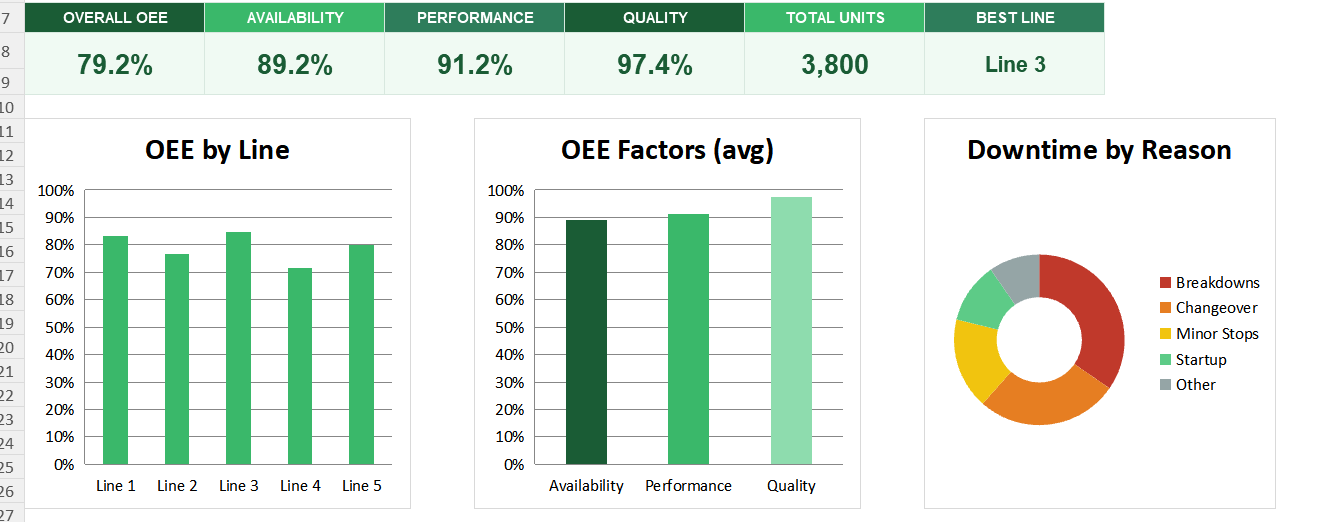
The second chart breaks the average score into availability, performance and quality.
Because it shows the three factors side by side, you can see which one drags OEE down.
The third chart is a doughnut that splits downtime by reason. So together they turn a low score into a clear list of what to fix first. Other factors to consider is MTTR (mean time to repair), MTBR (mean time between repairs) etc.
Chase your lowest factor first. If performance trails, attack small stops and slow cycles before worrying about the numbers that already look healthy.
Who uses an OEE dashboard
Plant and production managers use it to track effectiveness and target losses. It shows them where hidden capacity waits.
Continuous improvement teams use it to measure the impact of their projects. Shift supervisors use it to compare lines and catch problems early. Operations analysts use it as the base for deeper manufacturing reports. Because any line with output and downtime can be measured, the dashboard suits almost any plant.
The template is a starting point, not a fixed form. You can add more lines or track several shifts. You can change the downtime reasons to match your own losses.
The dashboard bends to your needs, so you can add a target OEE line to compare each line against a goal. A quick edit does it. You might also split performance loss into speed loss and minor stops, so you can attack each separately. The structure welcomes that kind of extension without complaint.
A production count alone hides the losses that quietly shrink your output. An OEE dashboard exposes them by scoring availability, performance and quality together, using the exact formula the whole method is built on. So download the template, enter your line data, and uncover the hidden capacity already sitting in your plant.