
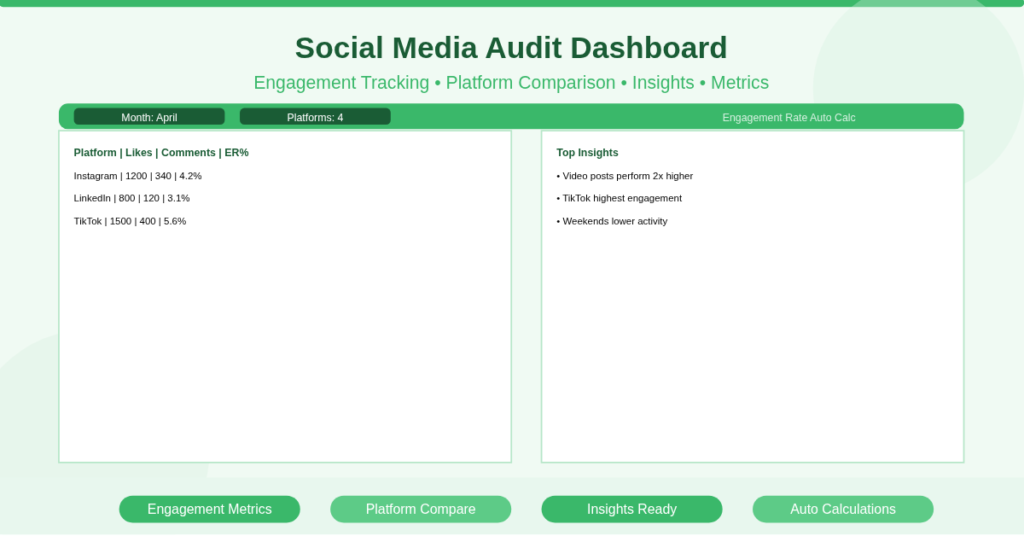
You post regularly. You gain followers. However, you don’t actually know what is working.
Some posts perform well, while others fail without explanation. You keep repeating content without clear data backing your decisions.
As a result, growth becomes inconsistent. Your strategy turns reactive instead of intentional.
A structured social media audit change this. It shows what performs, what fails, and where to focus next.
What Is a Social Media Audit Excel Template?
A social media audit Excel template is a structured workbook that evaluates performance across multiple platforms.
It tracks metrics like engagement, reach, followers, and content performance. It also compares platforms side by side.
This template suits marketers, agencies, and business owners. It turns raw data into actionable insights without complex tools.
Platform Performance Overview in One View
The template provides a consolidated view of all social platforms.
Side-by-Side Comparison
You can compare platforms such as:
- Instagram engagement vs LinkedIn engagement
- TikTok growth vs YouTube growth
- Post frequency vs performance
This makes it easy to identify where your effort delivers results.
Trend Identification
You can spot patterns quickly. For example, you may notice that video content consistently outperforms image posts.
Engagement Metrics That Actually Matter
The template focuses on key performance indicators instead of vanity metrics.
Core Metrics Included
You track values such as:
- Likes
- Comments
- Shares
- Followers
- Engagement rate
Content-Level Insights
Each post includes its own data. Consequently, you can identify high-performing content types like reels, carousels, or long-form posts.
Content Performance Breakdown
The template allows deeper analysis at the post level.
Top Performing Posts
You can filter and identify posts with the highest engagement.
For example, a post with 120 likes and 30 comments may outperform a post with 200 likes but zero interaction.
Low Performing Content
You also detect underperforming posts. Therefore, you avoid repeating ineffective formats.
How Does the Engagement Calculation Work?
The template uses simple but effective Excel formulas to standardize performance measurement.
Engagement Rate Formula
This formula calculates engagement relative to audience size. Consequently, you can compare accounts of different sizes fairly.
SUM Function for Aggregation
The SUM function totals like, comments, and shares across posts. This provides a monthly performance overview.
AVERAGE Function for Trends
The AVERAGE function calculates average engagement per post. As a result, you track consistency over time.
Practical Use Cases
This template fits multiple real-world scenarios.
Digital Marketing Agencies
Agencies audit client accounts monthly and present performance insights.
Small Business Owners
Business owners evaluate which content drives actual engagement.
Influencers
Creators identify which posts grow their audience and which do not.
Corporate Teams
Marketing teams review campaign performance across platforms.
Freelancers
Freelancers provide audit reports to clients with structured data.
How to Perform a Social Media Audit
Follow these steps to use the template effectively:
- Collect data from each platform (likes, comments, followers)
- Enter the data into the template
- Review engagement rate calculations
- Compare platform performance
- Identify top-performing and low-performing content
- Adjust your strategy based on insights
Download Your Social Media Audit Template
You need clarity, not assumptions, when managing social media.
This template gives you a structured way to measure performance and improve results.
It turns scattered data into actionable insights.
Download the Social Media Audit Excel Template now and make data-driven content decisions.