
Posting on one platform feels manageable. However, handling Instagram, LinkedIn, TikTok, and YouTube together quickly become chaotic. You forget what you posted yesterday. You duplicate ideas across platforms. Campaign timelines slip without warning.
As a result, your content loses consistency and impact. A structured social media multichannel plan solves this by bringing everything into one controlled system.
Explore Social Media Calendar Template in Excel.
What Is a Social Media Multichannel Plan Excel Template?
A social media multichannel plan Excel template is a centralized workbook that tracks content across multiple platforms in one place.
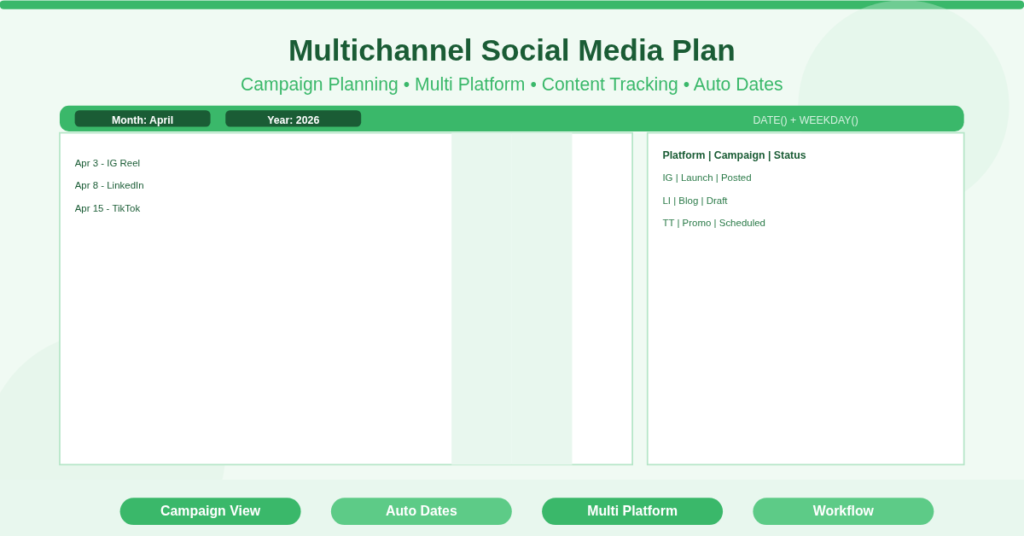
It combines a calendar view with a structured planning table. Each post is assigned a date, platform, content type, and status.
This template works for marketers, agencies, and business owners. It ensures every platform follows a coordinated strategy instead of isolated posting.
Central Calendar for Campaign-Level Visibility
The template includes a monthly calendar grid that displays scheduled posts across all platforms.
Unified View of All Channels
Each date shows planned content such as:
- April 3: Instagram Reel – Product teaser
- April 8: LinkedIn Article – Industry insights
- April 15: TikTok Video – Behind the scenes
This structure helps you avoid clustering too many posts on one day.
Campaign Alignment Across Dates
You can align posts around a campaign. For example, a product launch may include teaser posts, announcement posts, and follow-ups spread across different dates.
Detailed Content Planning Table
Beyond the calendar, the template includes a comprehensive planning table.
Structured Content Fields
Each row represents one post and includes:
- Date
- Platform
- Campaign Name
- Content Type
- Caption or Description
- Status
This creates a single source of truth for all content.
Workflow Tracking with Status
Posts move through stages such as Planned, Draft, Scheduled, and Posted. Consequently, you always know what is ready and what needs work.
Multi-Channel Coordination Without Overlap
Managing multiple platforms requires balance. This template enforces that structure.
Platform Distribution Strategy
You can review how often each platform receives content. For example, you may plan:
- Instagram: daily posts
- LinkedIn: three posts per week
- TikTok: two videos per week
Avoiding Content Duplication
Instead of repeating the same idea, you adapt it per platform. A long LinkedIn post becomes a short Instagram caption or a TikTok video concept.
How Does the Date and Scheduling Logic Work?
The template uses Excel functions to automate the calendar and keep data aligned.
DATE Function for Dynamic Calendar
The calendar grid generates dates dynamically. When you change the month, all dates update automatically.
WEEKDAY Function for Proper Alignment
The WEEKDAY function positions each date in the correct column. Therefore, the calendar always reflects the real-world layout.
TODAY() for Real-Time Tracking
The TODAY() function highlights the current day. As a result, you can instantly see where your schedule stands.
Practical Use Cases
This template supports real operational scenarios across industries.
Digital Marketing Agencies
Agencies manage multiple client accounts and track campaigns for each brand in one file.
E-commerce Businesses
Brands plan product launches with coordinated posts across Instagram, TikTok, and email campaigns.
Content Creators
Creators schedule videos, reels, and posts across platforms while maintaining consistency.
Corporate Marketing Teams
Teams align messaging across LinkedIn, blogs, and announcements for campaigns.
Freelancers
Freelancers manage multiple clients without mixing up schedules or deliverables.
How to Set Up Your Multichannel Plan
Follow these steps to configure the template:
- Enter the month and year in the calendar section
- Add content entries in the planning table
- Assign each post to a platform and campaign
- Write captions or notes for clarity
- Update the status as work progresses
- Review the calendar to balance posting frequency
Download Your Social Media Multichannel Plan
You need visibility across all platforms to maintain consistency. This template provides that structure in a simple Excel format.
It replaces scattered notes and misses posts with a clear, controlled workflow.
Download the social media Multichannel Plan Excel Template now and manage all your content from one place.