
Most content plans fail before they even start. You open Excel, write a few post ideas, and then forget them. A week later, you scramble to post something random.
As a result, your content becomes inconsistent. Your campaigns lose momentum. You also miss important dates like promotions or product launches.
A structured system fixes this instantly. A social media editorial calendar gives you visibility, consistency, and control over your content pipeline.
What Is a Social Media Editorial Calendar Excel Template?
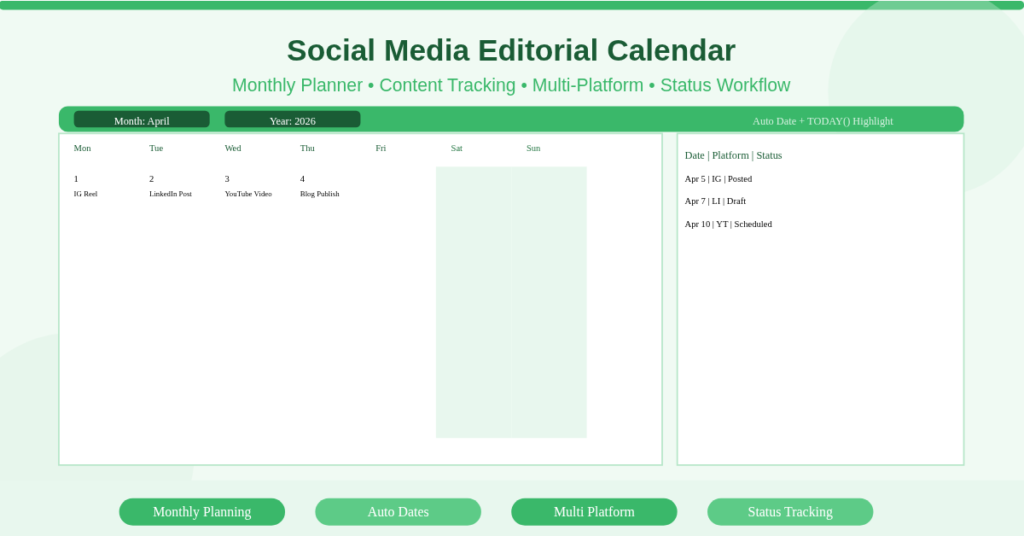
A social media editorial calendar Excel template is a structured planning sheet that maps content across dates, platforms, and campaigns.
It includes a calendar view for scheduling and a data table for content planning. You track each post with fields like platform, caption, content type, and publishing status.
This template works for marketers, business owners, freelancers, and content teams. It centralizes planning so you never rely on memory or scattered notes.
Monthly Calendar View with Real Scheduling Visibility
The core feature is the monthly calendar grid. It shows actual dates arranged week by week, just like a traditional calendar.
Visual Planning Across the Month
Each day displays scheduled posts. For example, you might see:
- April 5: Instagram Reel – Product Demo
- April 12: LinkedIn Post – Case Study
- April 20: YouTube Video – Tutorial Launch
This layout helps you identify gaps instantly. If a week looks empty, you know where to add content.
Weekend Differentiation
Weekends appear in a lighter shade. Consequently, you can plan lighter engagement content or pause posting based on strategy.
Content Planning Table for Detailed Control
Behind the calendar, the template includes a structured table.
Core Fields Included
Each row represents one post. It typically includes:
- Date
- Platform (Instagram, LinkedIn, TikTok)
- Content Type (Reel, Carousel, Blog)
- Caption or Notes
- Status (Planned, Draft, Scheduled, Posted)
Status Tracking System
You move posts through stages. For example, a post starts as “Planned,” then becomes “Draft,” and finally “Posted.”
This creates a simple workflow system inside Excel.
Multi-Platform Content Coordination
Managing multiple platforms manually creates confusion. However, this template standardizes everything.
Platform-Based Filtering
You can filter the table by platform. This allows you to view only Instagram or LinkedIn posts at once.
Balanced Content Distribution
You avoid over-posting on one platform while ignoring another. For instance, you can maintain a weekly structure like:
- 3 Instagram posts
- 2 LinkedIn posts
- 1 YouTube upload
How Does the Date Automation Work?
The template uses Excel date functions to keep everything aligned automatically.
DATE Function for Calendar Generation
The calendar grid uses the DATE function to generate each day dynamically. When you change the month or year, the entire calendar updates.
WEEKDAY for Alignment
The WEEKDAY function positions dates correctly in the grid. For example, if the month starts on a Wednesday, the template shifts the layout accordingly.
TODAY() for Dynamic Highlighting
The TODAY() function highlights the current date. Therefore, you always know where you stand in the schedule.
Practical Use Cases
Different users benefit from this template in practical ways.
Content Creators
A YouTuber plans weekly uploads and tracks thumbnails, scripts, and publishing dates.
Small Business Owners
A café schedules daily Instagram posts featuring menu items and promotions.
Marketing Teams
A team manages campaigns across LinkedIn, Instagram, and email announcements.
Freelancers
A social media manager tracks multiple client accounts in one structured system.
E-commerce Brands
A store aligns product launches with promotional posts and discount campaigns.
How to Set Up Your Editorial Calendar
Follow these steps to start using the template effectively:
- Enter the target month and year in the header section
- Populate the content table with planned posts
- Assign platforms and content types
- Update the status as work progresses
- Review the calendar view for gaps or overlaps
- Adjust posting frequency based on performance
Download Your Social Media Editorial Calendar
You need a system that keeps your content consistent and visible. This template gives you that structure without complexity.
It eliminates missed posts. It also improves planning accuracy. Download the Social-Media Editorial Calendar Excel Template now and take full control of your content schedule.