
Most content strategies break down because planning is inconsistent. You may start with a few ideas, but execution quickly becomes scattered. Some posts go live without strategy. Others get delayed or forgotten. Campaigns lose structure because content is not aligned.
As a result, your brand message becomes inconsistent. Growth slows down because your posting lacks direction. A social media content plan Excel template fixes this by creating a structured workflow for planning, tracking, and executing content.
If you want to create Social Media Content Plan online for free, Check out Social Media Content Plan Creator.
What Is a Social Media Content Plan Excel Template?
A social media content plan Excel template is a structured system that helps you organize content across platforms, campaigns, and timelines.
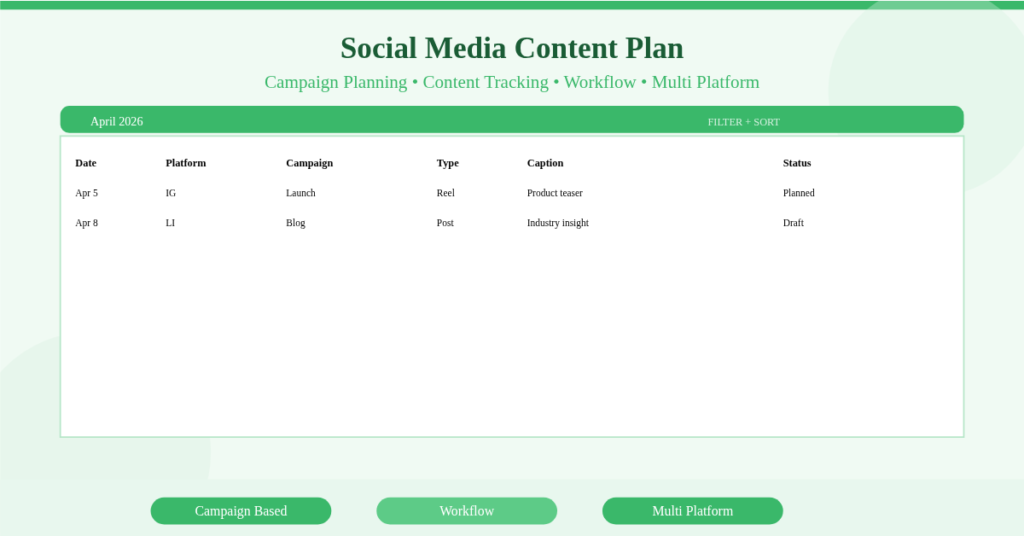
It combines a planning table with scheduling logic. Each post is assigned a date, platform, campaign, content type, and status.
This template acts as a social media planning spreadsheet and a content workflow manager in one place. It ensures that every piece of content is intentional and trackable.
Centralized Content Planning Across Campaigns
This template allows you to plan content at both micro and macro levels.
Campaign-Based Content Structuring
Each post can be linked to a campaign. For example, you may run a “Product Launch April” campaign.
You can then schedule teaser posts, launch announcements, and follow-up posts under the same campaign name.
Consequently, your content becomes connected instead of isolated.
Content Categorization for Better Strategy
You can classify posts as promotional, educational, or engagement-driven. This helps maintain a balanced content mix.
Detailed Content Fields for Full Control
The strength of this template lies in its structured data fields.
Core Columns That Drive Planning
Each content entry includes:
Date, platform, campaign, content type, caption, and status.
This structure transforms the file into a social media content planner Excel template that supports full lifecycle management.
Caption and Idea Storage
You can write captions directly in the sheet. This ensures that ideas are not lost or scattered across tools.
Workflow Management with Status Tracking
Content creation involves multiple stages. Without tracking, tasks easily fall behind.
Status-Based Workflow System
Each post moves through defined stages such as Planned, Draft, Scheduled, and Posted.
This creates a clear workflow. Therefore, you always know what is completed and what needs action.
Team Collaboration Support
If multiple people work on content, this system improves coordination. Each member can update the status without confusion.
Multi-Platform Content Planning Made Simple
Managing multiple platforms manually creates duplication and inconsistency.
Unified Platform Tracking
You can plan Instagram, LinkedIn, TikTok, and other platforms in one sheet.
Content Adaptation Across Channels
Instead of copying content, you adapt it. For example, a blog post becomes a LinkedIn article and a short Instagram caption.
This ensures better performance on each platform.
How Does the Date and Scheduling Logic Work?
The template uses Excel functions to automate date handling and ensure accuracy.
DATE Function for Dynamic Scheduling
The DATE function generates valid calendar dates. When you change the month or year, all scheduled entries align automatically.
Sorting and Filtering for Visibility
You can sort content by date or filter by platform or campaign. As a result, you gain better visibility into your schedule. Tutorial on Sorting and Filtering Function in Excel.
Content Gap Identification and Planning Efficiency
One major advantage of this template is visibility.
You can instantly see if certain days have no content. Similarly, you can detect overpoting on specific days.
This helps you maintain consistency. It also ensures balanced content distribution throughout the month.
Build a Repeatable Content System
This template is not just for one month. It becomes a repeatable system.
You can duplicate the sheet for future months. Over time, you build a structured content archive.
This allows you to analyze past campaigns and reuse successful ideas.
Practical Use Cases for This Template
This template supports different users effectively. Content creators use it to plan reels, posts, and videos consistently. Small businesses schedule promotions and customer engagement posts.
Marketing teams manage campaigns across multiple platforms. Freelancers handle multiple clients without confusion.
E-commerce brands align product launches with content schedules.
How to Set Up Your Social Media Content Plan
Follow these steps to use the template effectively:
- Enter content details including date and platform
- Assign campaign and content type
- Write captions or notes
- Update status as work progresses
- Filter by platform or campaign
- Review schedule for gaps and overlaps
Download Your Social Media Content Plan Excel Template
A structured system transforms your social media performance.
This social media content plan Excel template gives you clarity, consistency, and control over your content.
It replaces scattered ideas with a repeatable workflow.
Download the Social Media Content Plan Excel Template now and start planning your content with precision.