
If you look closely, most social media accounts are active—but not effective.
Posts go out every day. Some get likes. A few perform well. But when you step back, there is no clear direction.
You cannot answer simple questions like:
Which campaign actually worked?
Which platform drives results?
What should you repeat next month?
That gap usually comes from one missing piece—a structured social media marketing plan.
What This Social Media Marketing Plan Excel Template Actually Does
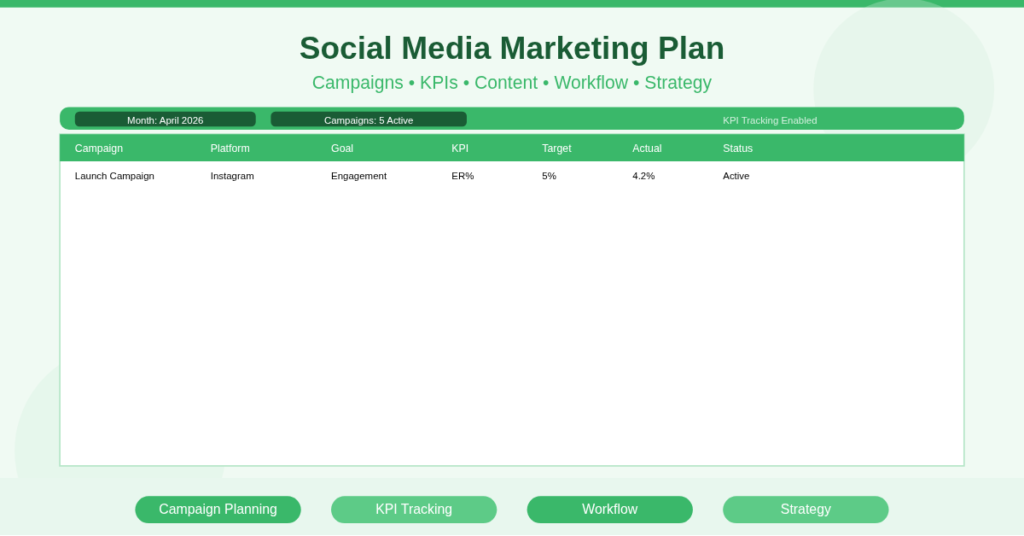
This is not just a content calendar. It is a working document that connects strategy, execution, and results.
Instead of treating posts as isolated tasks, this template helps you think in terms of campaigns and outcomes.
You plan what you want to achieve first. Then you map content, assign platforms, and track progress in the same place.
That shift alone changes how you approach social media.
Plan Campaigns Like a Marketer, Not a Content Poster
The strongest part of this template is how it forces you to think in campaigns.
From Random Posts to Structured Campaigns
Let’s say you are launching a product.
Instead of posting randomly, you plan:
- Teaser posts before launch
- Announcement posts on launch day
- Follow-up content after launch
All of this sits under one campaign name. So when you review performance later, you see the full picture—not scattered posts.
Tie Every Campaign to a Clear Goal
You can assign a goal to each campaign. For example:
- Engagement for awareness
- Clicks for traffic
- Leads for conversions
This keeps your content focused. You stop posting just to stay active.
Track KPIs Without Overcomplicating It
Most tools either overwhelm you or hide the numbers that matter.
This template keeps it simple.
You track the metrics that actually influence decisions. Engagement, clicks, conversions, and follower growth are enough for most use cases.
Because everything sits next to your campaign plan, you can immediately see what worked and what did not.
That feedback loop is where improvement happens.
Keep Content, Strategy, and Execution in One Place
One common problem is fragmentation.
Ideas sit in notes. Captions sit in drafts. Schedules sit in a different tool. Performance data sits somewhere else.
This template removes that fragmentation.
You write the content idea, assign it to a campaign, schedule it, and track its status—all in one row.
That clarity reduces mental load. You spend less time searching and more time executing.
How the Workflow Keeps Everything Moving
Execution usually breaks, not planning.
You start with good intentions. Then deadlines slip. Posts remain unfinished. Campaigns stall halfway.
This template avoids that through simple status tracking.
Each row moves through stages like:
Planned → In Progress → Scheduled → Completed
It is basic, but effective. You always know what needs attention.
If you work in a team, this becomes even more valuable. Everyone sees the same status without asking.
How the Excel Logic Supports the System
The template uses simple Excel logic to keep things dynamic without becoming complex.
Date Control for Structured Scheduling
You control the timeline using standard date functions. This keeps campaigns aligned with actual calendar dates.
Filters That Actually Help Decision-Making
You can filter by campaign, platform, or status.
For example, you can instantly view:
- Only Instagram campaigns
- Only active campaigns
- Only incomplete tasks
This is where Excel becomes powerful. You are not just storing data—you are using it.
Where This Template Really Helps in Real Life
This is where it becomes practical.
A small business owner can finally see which promotions worked last month.
A freelancer can manage multiple clients without mixing up campaigns.
A marketing team can align content across platforms without constant coordination calls.
Even a solo creator benefits because the template removes guesswork.
You Start Seeing Patterns Over Time
After a few weeks, something interesting happens.
You start recognizing patterns:
- Certain campaigns perform better
- Some platforms respond differently
- Specific content types consistently work
This is when your strategy improves. You are no longer experimenting blindly. You are building on real insights.
How to Start Using This Template Properly
Keep it simple when you begin:
- Define one campaign for the month
- Add 10–15 planned posts
- Assign platform and objective
- Update status daily or weekly
- Review results at the end of the month
Do not overcomplicate it. The value comes from consistent use, not perfect setup.
Download the Social Media Marketing Plan Excel Template
If your current process feels scattered, this will fix it.
This social media marketing plan Excel template gives you structure without adding complexity.
You will plan better, execute faster, and understand what actually works.
Download the template and turn your social media activity into a real marketing system.