
Most people don’t struggle with ideas. They struggle with consistency.
One week, you post regularly. The next week, everything slows down. Important campaigns get delayed, and content feels rushed.
As a result, your audience sees irregular activity. Engagement drops because there is no predictable rhythm.
A social media planning calendar fixes this problem by giving you a clear visual schedule for your content. Explore online tool for “Social Media Content Planning” for free.
What Is a Social Media Planning Calendar Excel Template?
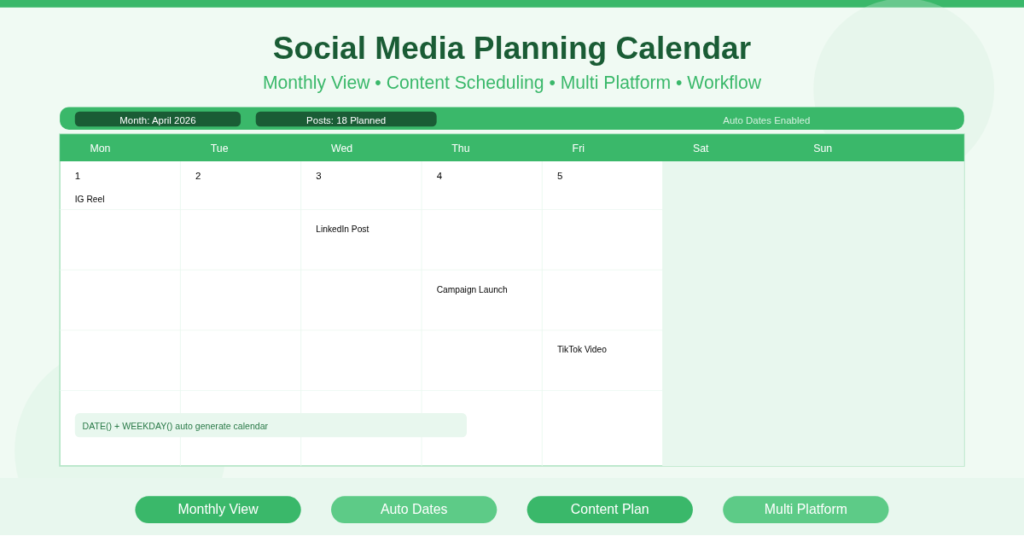
A social media planning calendar Excel template is a structured monthly planner that maps your content across dates, platforms, and campaigns.
It combines a calendar grid with a content tracking system. You assign posts to specific days, define platforms, and track progress.
This template works as both a social media calendar Excel template and a content planning tool. It ensures every post fits into a structured timeline.
Monthly Calendar View That Shows Everything at Once
The most useful feature is the calendar layout.
Visual Scheduling Across Dates
You can see all posts for the month in one view. For example, April 5 may show an Instagram Reel, while April 10 includes a LinkedIn post.
This helps you understand your posting pattern immediately.
Identify Gaps and Overlaps
You quickly notice empty days or crowded schedules. Therefore, you can adjust content before issues arise.
Content Planning Table for Detailed Control
Behind the calendar, the template includes a structured table.
Track Content with Key Fields
Each entry includes date, platform, content type, caption, and status. This structure keeps all information in one place.
Keep Ideas Organized
Instead of storing ideas separately, you write captions directly in the template. Consequently, you reduce confusion and duplication.
Multi-Platform Planning Without Confusion
Managing multiple platforms manually becomes messy.
Plan Across Platforms in One Sheet
You can track Instagram, LinkedIn, TikTok, and other channels together. This ensures consistency across platforms.
Balance Content Distribution
For example, you may plan three Instagram posts and two LinkedIn posts each week. This keeps your content balanced.
How Does the Calendar Automatically Adjust Dates?
The template uses Excel functions to maintain accuracy.
DATE Function for Calendar Logic
The DATE function generates all calendar dates dynamically. When you change the month, the entire calendar updates.
WEEKDAY Function for Alignment
The WEEKDAY function places dates under the correct day columns. Therefore, the calendar always reflects real-world structure.
TODAY() for Current Tracking
The TODAY() function highlights the current date. As a result, you always know where you stand.
Practical Use Cases for Real Users
Different users benefit from this template in practical ways.
Content creators use it to plan reels and videos consistently. Small business owners schedule promotions and daily posts.
Marketing teams coordinate campaigns across platforms. Freelancers manage multiple clients without confusion.
E-commerce brands align product launches with content schedules.
How to Set Up Your Social Media Planning Calendar
Follow these steps to get started:
- Enter the month and year
- Add content entries with dates
- Assign platform and content type
- Write captions or notes
- Update status as work progresses
- Review the calendar for gaps
Download Your Social Media Planning Calendar
Consistency drives growth. However, consistency requires structure.
This social media planning calendar Excel template gives you a clear system to organize content and maintain regular posting.
It replaces scattered ideas with a structured plan.
Download the Social Media Planning Calendar Excel Template now and take control of your content schedule.