
A budget planner is the foundation of taking control of your money, because a budget is simply a plan for where it should go. Without one, spending happens by default and the month ends in a vague worry about whether you overspent. So setting a budget for each category, and tracking what you actually spend, turns guesswork into control.
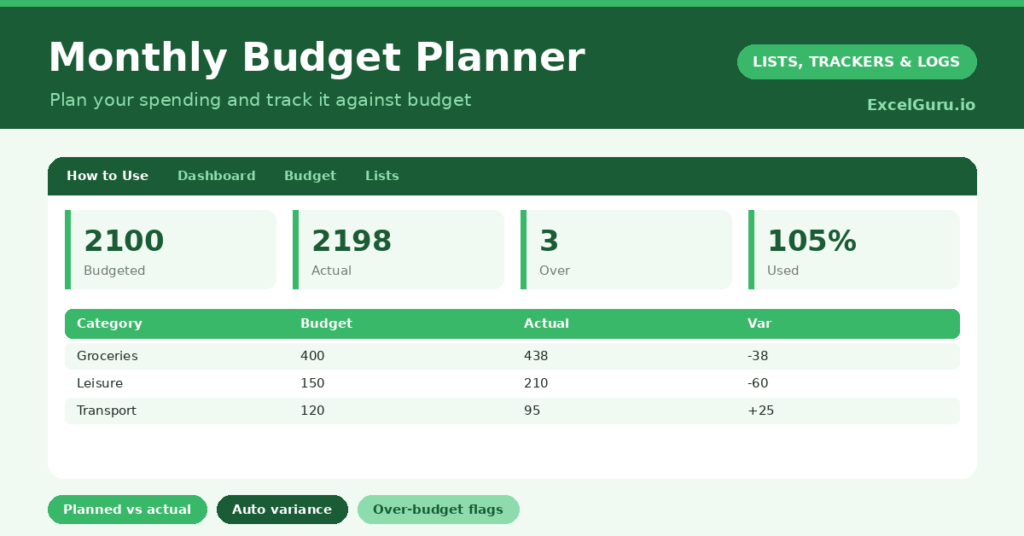
This free template lets you set a budget per category and enter your actual spending against it. So it works out the variance and flags where you have gone over. As a result, you can see at a glance whether you are on plan, and adjust before the month runs away from you.
Also, check out Reorder Point Tracker Excel Template for better inventory management.
What does the budget planner include?
The template is one budget table feeding a clear dashboard. A dropdown keeps the spending types tidy. In short, you get the following:
- A budget table with the category, type, budgeted amount, actual amount, an auto-calculated variance and percent used.
- An automatic variance and percent used for every category.
- A dropdown for type, grouping spending into essential, lifestyle, savings and debt.
- Colour-coding that flags any category where you have gone over budget.
- A dashboard showing total budgeted, total actual, what remains, your category count, how many are over budget and your overall percentage used.

Which formulas power the budget planner?
Two formulas keep your budget honest. The variance is =Budgeted – Actual, so a positive figure means you are under budget and a negative one means over. A rule highlights the negatives, so overspending stands out at once.
The percent used is =Actual / Budgeted, showing how much of each category’s budget you have spent. On the dashboard, a SUM totals your budgeted and actual figures, the remaining is the difference, and a SUMPRODUCT counts the over-budget categories. So the planner turns numbers into an instant read on your spending.
Why use a budget planner?
The first benefit is control. A budget gives every pound a job before the month starts, so you spend with intention rather than drifting. So you are far less likely to reach month-end wondering where it all went.
The second benefit is early warning. Tracking actual against budget shows a category creeping over while there is still time to rein it in. The variance pinpoints exactly where the pressure is. Grouping by type shows the balance between essentials, lifestyle and saving. Furthermore, a budget that is reviewed becomes more realistic each month. In short, the planner turns money worry into money management.
What does the dashboard reveal?
The dashboard gives you an honest read on your month. The percentage-used figure is the headline, showing how much of your total budget you have spent. So a number creeping past 100% is a clear signal to ease off.
The remaining figure shows what is left across the whole budget, useful for the rest of the month. The over-budget count points at exactly which categories need attention. The budgeted-versus-actual totals show the big picture. Because it all updates as you enter spending, you can course-correct mid-month. So the dashboard keeps you in control rather than reacting too late.
How do you use it?
At the start of the month, set a realistic budget for each category, based on what you actually tend to spend. So the plan is achievable, not aspirational. Then, as the month goes on, enter your actual spending against each category.
The variance and percent used update instantly, so you can see any category heading over budget. Check the dashboard regularly, and adjust your spending in the categories under pressure. At month-end, review how you did and refine next month’s budget. Because the plan improves each month, your budgeting gets steadily more accurate. In short, plan, track and review.
How do you customize it?
Edit the types and sample categories on the Lists tab to match your life. Additionally, you can add columns for the previous month’s actual, a notes field, or a sub-category for detailed tracking. An income section at the top helps you budget against what you earn. The template suits a personal budget, a household, or a simple business cash plan.

What mistakes should you avoid?
The first mistake is setting an unrealistic budget that ignores what you actually spend. So base your first budget on real figures, then refine it. The second mistake is setting the budget but never entering your actuals.
The control comes from comparing the two, so keep your spending updated. Finally, do not abandon the budget after one over-budget month. Budgeting is a skill that improves with practice, so treat each month as information and adjust. A budget you refine beats a perfect one you give up on.
Frequently asked questions
How does the budget planner show if I am overspending?
It calculates the variance between your budget and actual for each category, and flags any negative variance in red. The dashboard also counts your over-budget categories and your overall percentage used.
Should I budget based on past spending?
Yes, especially at first. Basing your budget on what you actually tend to spend makes it realistic and achievable. You can then refine it each month as you learn where your money really goes.
Can I track income too?
Yes. Add an income row or section at the top, and you can budget your spending against what you earn. Many people add their income categories alongside their expense ones for a full picture.
Set a realistic budget per category, track your actual spending, and review at month-end. The dashboard then flags overspending and shows what remains. A budget planner turns the vague worry of “did I overspend?” into a clear, controllable plan, so each month your budgeting gets a little more accurate and a lot less stressful.